IPTV Equipment: 15 Essential Devices for a Better Streaming Experience in 2026
Introduction: Why IPTV Equipment Matters for Modern Streaming
The way people watch television has changed dramatically over the past decade. Traditional cable subscriptions and satellite television are no longer the only options for households that want access to entertainment, news, sports, and movies. Improvements in broadband internet, connected televisions, and digital media technology have created new opportunities for watching television through internet-based platforms. At the center of this transformation is IPTV equipment, which includes the devices and accessories needed to receive, process, and display television content delivered through Internet Protocol networks.
For American households, choosing the right IPTV equipment can make a noticeable difference in everyday viewing. A modern smart television, a dedicated streaming device, a reliable internet router, and a suitable network connection can work together to provide a convenient entertainment setup. However, not every household needs to purchase expensive hardware. Some televisions already include the necessary software and connectivity, while others may benefit from an external streaming box or additional networking equipment.
Another important development is the growing popularity of ad-supported streaming services. Platforms offering free, advertising-supported movies, television programs, and selected live channels have encouraged more consumers to explore connected television devices. These services demonstrate how internet-connected equipment can support different entertainment models without requiring every viewer to purchase a traditional cable package.
Understanding IPTV equipment involves more than knowing which streaming box to buy. Consumers should also consider display resolution, processing performance, Wi-Fi standards, Ethernet connectivity, storage capacity, operating systems, application compatibility, and long-term software support.
This guide explores the most important IPTV equipment categories, explains how different devices work together, compares popular hardware options, and provides practical recommendations for building a reliable home entertainment setup in 2026.
Whether you are upgrading an existing television, replacing an older streaming device, or creating a new home media system, understanding the available equipment can help you make a more informed decision.
1. What Is IPTV Equipment?

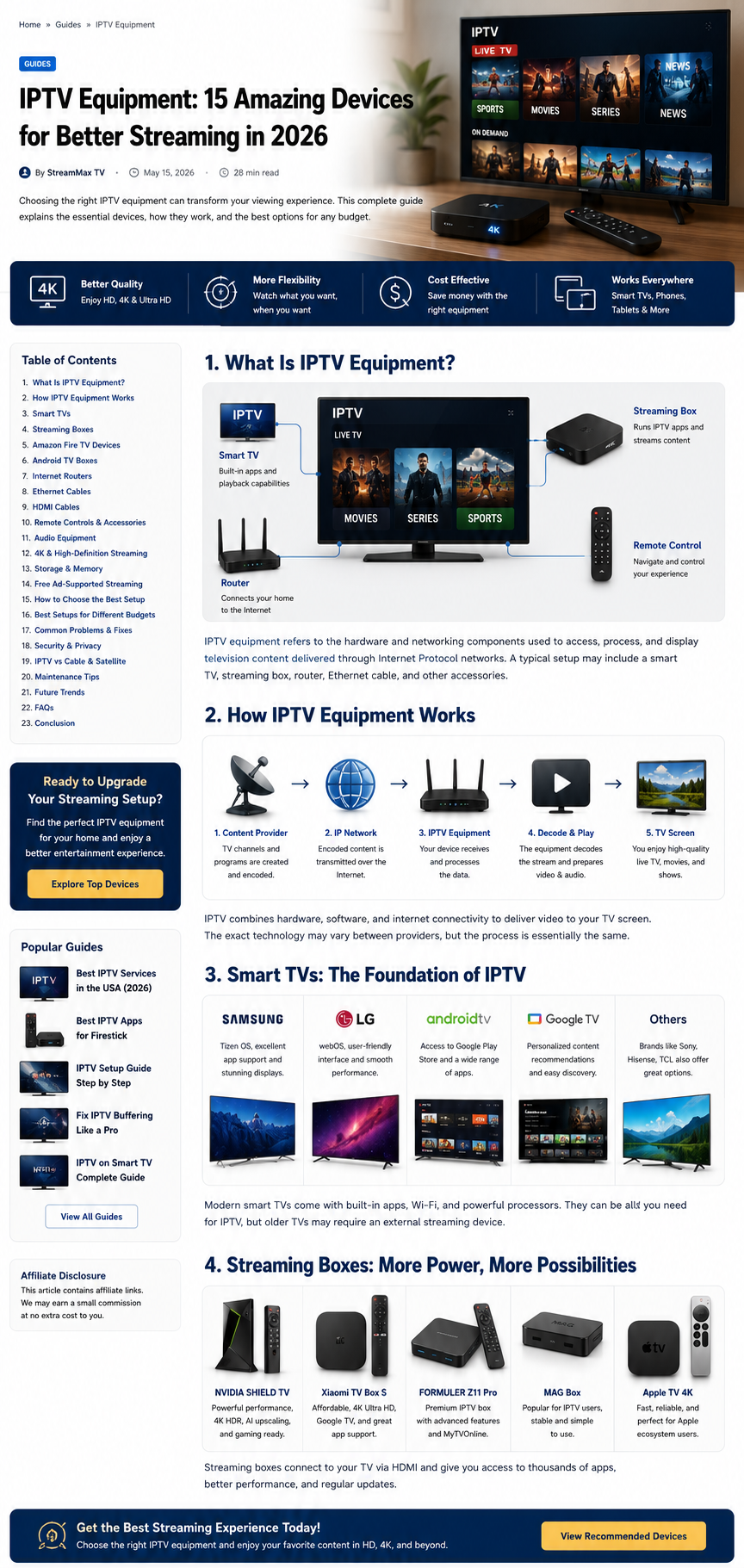
IPTV equipment refers to the hardware and networking components used to access, process, and display television content delivered through Internet Protocol networks.
Unlike traditional television equipment that primarily receives signals through antennas, satellite dishes, or cable connections, internet-based television relies on network connectivity and compatible playback devices.
A typical IPTV setup may include a smart television, streaming box, broadband router, Ethernet cable, or another compatible device. The exact equipment depends on the television service, its technical requirements, and the user’s preferred viewing environment.
For example, someone with a modern Google TV might not need an additional streaming box because the television already supports compatible applications. However, someone with an older television may need an external device to access modern streaming platforms.
Understanding the Main Components
Several hardware components can contribute to an IPTV installation.
1. Display device: A television or monitor that displays the video content.
2. Streaming device: Hardware that runs compatible television and media applications.
3. Internet router: A device that connects household equipment to the broadband network.
4. Network connection: Wi-Fi or Ethernet connectivity that transfers video data.
5. HDMI cable: A digital connection that carries audio and video from an external device to a television.
6. Remote control: An accessory used to navigate menus, launch applications, and adjust settings.
7. Audio equipment: Soundbars, speakers, or home theater systems that improve the listening experience.
8. Power accessories: Adapters and cables that provide electricity to connected devices.
Not every IPTV equipment setup requires every component. Many modern televisions combine several functions into one product, reducing the number of external accessories needed.
IPTV Equipment vs. IPTV Applications
It is important to understand the difference between hardware and software.
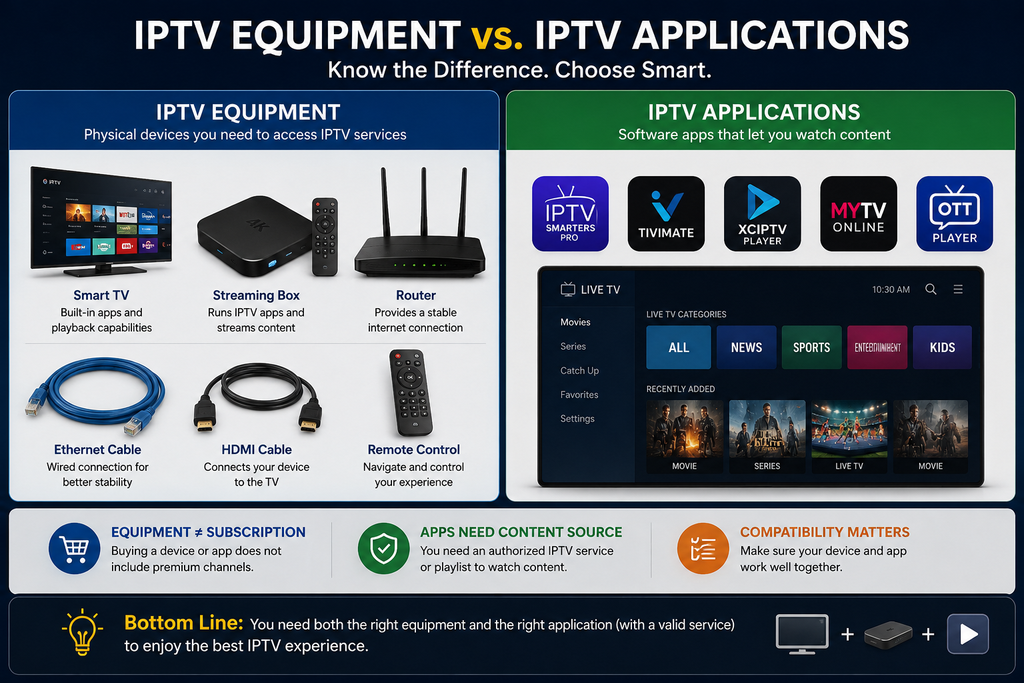
IPTV equipment refers to the physical devices used to access television services. IPTV applications are software programs that provide an interface for browsing and playing compatible content.
A streaming box may support several media applications, but installing an application does not automatically provide a television subscription. Choosing compatible IPTV equipment is only the first step toward accessing internet-based entertainment.
Likewise, a compatible television does not automatically include access to every television channel or movie catalog. Users generally need an authorized service or content source that works with their chosen application and IPTV equipment.
Understanding this distinction helps consumers avoid purchasing unnecessary hardware or confusing a media player with a content provider.
2. How IPTV Equipment Works
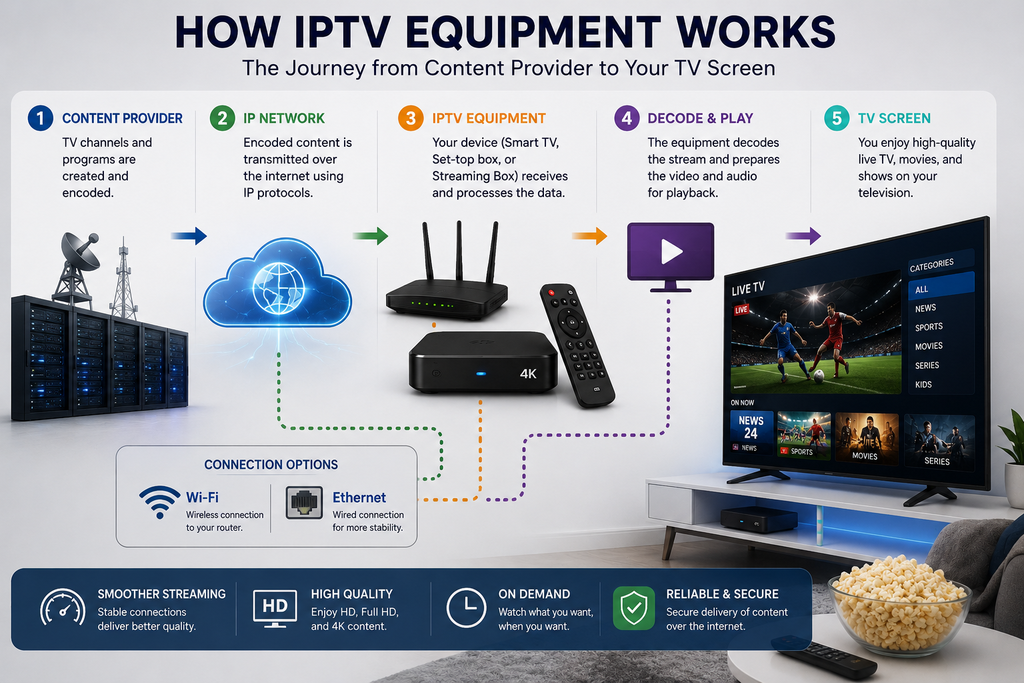
A modern IPTV equipment setup combines hardware, software, and internet connectivity to deliver video to a television screen.
The process begins when an authorized content provider prepares television programming for digital distribution. Video is encoded into a suitable format and delivered through an IP network. Compatible IPTV equipment receives the data and helps process it for playback.
The user’s equipment then decodes the information and displays the content on the television screen. The performance of IPTV equipment can depend on device compatibility, processing capabilities, and network stability.
Although the technical architecture can differ between providers, the general viewing process follows several stages.
Step 1: Connecting to the Internet
The streaming device or smart television connects to the household network through Wi-Fi or Ethernet.
The router manages communication between the connected equipment and the internet service provider.
A stable connection is important because streaming applications continuously receive video data during playback.
Step 2: Opening a Compatible Application
The user launches a supported streaming application.
Depending on the service, the application may provide live television, movies, recorded programs, or other video content.
Some applications require an account, while others provide access to free advertising-supported programming.
Step 3: Selecting Content
The viewer browses the available categories and selects a program.
The application communicates with the relevant content delivery infrastructure and requests the selected video.
Step 4: Processing Video Data
The streaming device receives compressed video and audio data.
Its processor and decoding hardware convert the information into a format that the television can display.
Supported video codecs, resolution capabilities, and hardware performance can influence playback compatibility.
Step 5: Displaying the Content
The television receives the processed video signal and displays the picture.
Audio may be played through the television’s built-in speakers, a soundbar, or an external home theater system.
This process demonstrates why IPTV equipment should be considered as part of a complete entertainment system rather than as one individual product.
3. Smart TVs: The Foundation of Modern IPTV Equipment
Smart televisions are among the most convenient options for internet-based entertainment.
They combine a traditional television display with an operating system that supports applications, network connectivity, and digital media features.
For many households, a compatible smart TV can provide everything necessary to start using supported IPTV services without purchasing another streaming device.
Samsung Smart TVs
Samsung televisions commonly use the Tizen operating system.
Depending on the model and region, users can access applications through Samsung’s official application environment.
Samsung smart TVs are available in different display technologies, including LED, QLED, and OLED.
When evaluating Samsung IPTV equipment compatibility, consumers should check the exact model number, supported application versions, and available software updates.
Older models may have different application availability compared with newer televisions.
LG Smart TVs
LG smart televisions commonly use webOS, an operating system that provides access to applications, television settings, and connected entertainment features. Choosing compatible IPTV equipment is important when setting up streaming applications on an LG television.
LG models vary considerably in processing performance, display technology, and supported applications. Therefore, checking IPTV equipment compatibility can help users avoid installation problems and choose the right streaming solution.
Before choosing an IPTV application, confirm that it supports the television’s specific webOS version and works correctly with your existing IPTV equipment.
Android TV and Google TV
Android TV and Google TV offer access to a broad ecosystem of television applications.
Many televisions and streaming devices use these platforms.
Their application support makes them useful options for consumers who want flexibility when selecting compatible IPTV equipment.
Google TV also provides an integrated content-discovery interface on supported devices.
However, application compatibility should always be verified rather than assumed.
Advantages of Smart TV Hardware
Smart televisions offer several benefits:
- Fewer external devices.
- Integrated Wi-Fi connectivity.
- Built-in application stores.
- Direct HDMI support for additional hardware.
- Convenient remote-control navigation.
- Access to television settings and display adjustments.
Limitations of Smart TVs
Smart televisions can also have limitations.
Older models may receive fewer software updates, have limited internal storage, or use slower processors.
Some applications may eventually stop supporting older operating systems.
In these situations, an external streaming device can provide a practical upgrade without replacing the entire television.
4. Streaming Boxes: Dedicated IPTV Equipment for Better Flexibility
Streaming boxes are compact devices designed to bring internet-based entertainment to compatible televisions.
They connect through HDMI and generally include their own operating system, processor, memory, and network connectivity.
For households with older televisions, a streaming box can provide access to modern applications and services.
Android TV Streaming Boxes
Android TV devices are popular because they support a wide selection of compatible entertainment applications.
Depending on the model, they may include:
- 4K video output.
- Wi-Fi connectivity.
- Bluetooth.
- HDMI output.
- Voice-control support.
- External storage options.
- Application-store access.
When comparing Android IPTV equipment, look beyond advertised specifications.
Check whether the manufacturer provides official software updates, whether the device has appropriate certifications, and whether the applications you need are supported.
Google TV Streaming Boxes
Google TV devices provide a content-focused interface designed to help viewers discover entertainment across supported applications.
They may offer personalized recommendations, voice search, and integration with compatible smart-home features.
A Google TV device can be useful for households that want a straightforward streaming experience without complicated installation procedures.
Dedicated Media Players
Some streaming hardware is designed specifically for high-quality media playback.
These products may support advanced audio formats, high-resolution video, and extensive media-library organization.
For example, certain media players are particularly useful for people who maintain their own digital movie collections.
The best option depends on the viewer’s content sources, television specifications, and preferred interface.
What to Check Before Buying a Streaming Box
When purchasing IPTV equipment, evaluate:
- Operating system and application availability.
- Processor and memory specifications.
- Supported video resolutions.
- Wi-Fi standards.
- Ethernet availability.
- HDMI output specifications.
- Manufacturer support.
- Security and software updates.
A more expensive device is not automatically better for every household.
Choose hardware based on actual requirements rather than promotional specifications alone.
5. Amazon Fire TV Devices and IPTV Compatibility
Amazon Fire TV products are widely used in American households.
They provide a convenient way to access internet-based television and entertainment applications through an HDMI connection.
Different Fire TV models offer different performance levels, storage capacities, and connectivity features.
Fire TV Stick
The Fire TV Stick family includes compact streaming devices that connect directly to a television’s HDMI port.
These devices are suitable for people who want to add streaming functionality without replacing their existing television.
Depending on the model, features may include:
- HD or 4K playback.
- Wi-Fi connectivity.
- Voice remote.
- Application installation.
- Bluetooth support.
- Integration with Amazon services.
Fire TV Stick 4K
The Fire TV Stick 4K series is designed for televisions that support Ultra HD resolution.
Depending on the model, it may also support HDR formats and improved wireless connectivity.
Consumers should verify their television’s HDMI and display specifications before purchasing this type of IPTV equipment.
Fire TV Cube
The Fire TV Cube combines streaming hardware with additional voice-control capabilities.
It may appeal to users who want a more advanced living-room entertainment setup.
Its features and performance differ from those of the smaller Fire TV Stick devices.
Fire TV Advantages
Fire TV products offer several practical benefits:
- Compact installation.
- Straightforward remote control.
- Access to supported applications.
- Integration with compatible Amazon services.
- Multiple hardware options.
- Support for different television resolutions.
Fire TV Installation Considerations
A Fire TV device generally connects to the television through HDMI and receives power through its supplied power arrangement.
Users should follow the manufacturer’s installation instructions.
After connecting the hardware, configure the network, sign in where required, and install applications through trusted distribution channels.
Before purchasing an IPTV subscription, verify that the provider and application support the exact Fire TV model.
6. Android TV Boxes: What Makes Them Different?
Android TV boxes provide another category of IPTV equipment.
They can be particularly useful for consumers who prefer a separate device rather than relying on a television’s built-in operating system.
However, not all Android TV boxes offer the same quality or compatibility.
Certified Android TV Devices
Certified devices generally offer a more predictable application experience.
They may include access to official application stores and support for recognized streaming technologies.
Certification can also affect whether certain premium applications support protected video playback at specific resolutions.
Consumers should check official documentation before purchasing.
Generic Android Boxes
Generic Android boxes are available at many different prices.
Some advertise impressive specifications, but the actual performance and software quality can vary considerably.
Potential concerns include:
- Limited security updates.
- Unclear manufacturer support.
- Inconsistent application compatibility.
- Unverified hardware specifications.
- Poorly maintained operating systems.
A cheap Android box may appear attractive, but consumers should consider the long-term reliability of the device.
Choosing the Right Android Box
A good Android IPTV equipment purchase should prioritize stability, compatibility, and support.
Look for a recognizable manufacturer, transparent specifications, regular software updates, and appropriate application certification.
Avoid devices that promise unrestricted access to premium television programming without explaining their legal content sources.
7. Internet Routers: Essential Networking Equipment for IPTV
A router is one of the most important components of any internet-based entertainment system.
Even powerful streaming hardware cannot provide consistent playback if the household network is unreliable.
The router manages traffic between connected devices and the internet.
It can influence connection stability, wireless coverage, and the performance of multiple simultaneous streams.
Wi-Fi 5, Wi-Fi 6, and Wi-Fi 7
Wireless networking standards continue to improve.
Wi-Fi 5, Wi-Fi 6, and Wi-Fi 7 represent different generations of wireless technology.
Newer standards can provide improvements in capacity, efficiency, and performance under suitable conditions.
However, both the router and the connected device need compatible hardware to benefit from newer standards.
Buying a Wi-Fi 7 router will not automatically improve every IPTV setup.
Dual-Band Routers
Dual-band routers operate using 2.4 GHz and 5 GHz wireless bands.
The 2.4 GHz band generally offers better range, while 5 GHz can provide higher speeds over shorter distances.
The best option depends on the distance between the router and television, surrounding interference, and device capabilities.
Tri-Band Routers
Tri-band routers offer an additional wireless band.
They can be useful in households with many connected devices or demanding network activities.
However, a tri-band router is not necessary for every home.
Consumers should consider the size of their property and the number of simultaneous connections before upgrading.
Router Placement
Router placement can significantly affect IPTV performance.
For better wireless coverage:
- Place the router in a central location.
- Avoid enclosed cabinets.
- Keep it away from major sources of interference.
- Position it in an elevated location where practical.
- Avoid placing it behind large metal objects.
Small changes in router placement can sometimes improve wireless performance without requiring new equipment.
8. Ethernet Cables: A Reliable Connection for IPTV Equipment
Ethernet cables provide a direct wired connection between a router and a compatible device.
They are particularly useful when wireless interference causes inconsistent streaming performance.
A wired connection can offer more predictable network performance than Wi-Fi in many household environments.
Cat5e Ethernet Cables
Cat5e cables support Gigabit Ethernet under suitable conditions.
They remain a practical option for many home entertainment installations.
For ordinary HD and 4K streaming, a properly functioning Cat5e connection is generally more than sufficient.
Cat6 Ethernet Cables
Cat6 cables offer improved specifications compared with Cat5e.
They can support higher network speeds over suitable distances and are commonly used in home networking installations.
Cat6a Ethernet Cables
Cat6a cables are designed for higher-performance networking and can support 10 Gigabit Ethernet over specified distances.
They may be useful in more advanced home networks, although most television streaming setups do not require this level of capacity.
Is Ethernet Better Than Wi-Fi?
Ethernet can reduce wireless interference and improve connection consistency.
However, modern Wi-Fi can also provide excellent streaming performance when properly configured.
The right choice depends on the home’s layout, router location, available cabling, and connected hardware.
For an IPTV equipment setup experiencing repeated buffering, testing Ethernet is a sensible troubleshooting step.
9. HDMI Cables and Video Connections
HDMI cables carry digital video and audio between streaming devices and televisions.
They are essential when using external streaming boxes, game consoles, and many other entertainment devices.
HDMI 2.0
HDMI 2.0 supports various high-resolution video formats, including 4K at compatible frame rates.
It remains sufficient for many standard streaming setups.
HDMI 2.1
HDMI 2.1 introduces additional capabilities, including higher bandwidth and support for advanced video features.
These capabilities are particularly relevant to gaming and certain high-end display systems.
Not every streaming device requires HDMI 2.1.
Choosing an HDMI Cable
When buying IPTV equipment accessories, choose a cable that supports the resolution and refresh rate of your hardware.
For 4K installations, verify the cable’s certification and specifications.
Avoid paying extra for features your television and streaming device cannot use.
10. Remote Controls and Accessories
Remote controls are an important part of the everyday television experience.
A well-designed remote makes it easier to navigate applications, search for content, adjust volume, and manage playback.
Voice Remote Controls
Some modern streaming devices include voice remotes.
These allow users to search for entertainment, open applications, and control compatible smart-home functions using voice commands.
Voice features can be particularly convenient for viewers who prefer not to type using an on-screen keyboard.
Bluetooth Remotes
Bluetooth remotes communicate wirelessly with compatible devices.
They do not always require direct line-of-sight communication in the same way traditional infrared remotes do.
Universal Remotes
Universal remotes can control several compatible entertainment devices through a single accessory.
They may be useful for households with televisions, streaming boxes, soundbars, and other equipment.
Wireless Keyboards
Some users prefer wireless keyboards when navigating applications that involve text searches or account configuration.
However, keyboard compatibility depends on the streaming device and application.
11. Audio Equipment for a Better IPTV Experience
Picture quality is only one part of home entertainment.
Audio equipment can improve dialogue clarity, sound separation, and the overall experience of watching movies or television.
Built-In Television Speakers
Most modern televisions include built-in speakers.
For casual viewing, they may provide sufficient sound quality.
However, slim television designs can limit speaker size and audio performance.
Soundbars
Soundbars are compact audio systems designed to improve television sound.
Many models connect through HDMI ARC or eARC, while others support optical or wireless connections.
They can provide clearer dialogue and a wider sound presentation compared with basic television speakers.
Surround Sound Systems
Home theater systems use multiple speakers to create a more immersive audio experience.
They may include dedicated front, center, surround, and subwoofer channels.
For viewers who regularly watch movies, sports, and premium entertainment, a surround system can be a worthwhile upgrade.
Headphones
Wireless headphones can be useful when watching television at night or in shared living spaces.
Bluetooth compatibility, audio latency, and device support should be checked before purchasing.
12. IPTV Equipment for 4K and High-Definition Streaming
Video resolution is one of the most important specifications when selecting streaming hardware.
A device may advertise 4K support, but the television, content source, application, and internet connection must also support the required format.
Understanding HD and Full HD
High Definition commonly refers to 720p or 1080p video.
Full HD usually refers to 1920 × 1080 resolution.
These formats remain suitable for many households and smaller television screens.
Understanding 4K Ultra HD
4K Ultra HD generally refers to a resolution of 3840 × 2160 pixels.
It provides four times the pixel count of Full HD.
A compatible IPTV equipment setup should include a 4K-capable television, a suitable playback device, and content genuinely available in 4K.
HDR Technology
High Dynamic Range improves the range of brightness and color information in supported video.
Common formats include HDR10, HDR10+, and Dolby Vision.
Compatibility varies between televisions, streaming devices, and content providers.
A device supporting one HDR format may not support every other format.
Does Every Household Need 4K Equipment?
No.
The benefits of 4K depend on screen size, viewing distance, content quality, and personal preferences.
A household with a smaller HD television may not benefit significantly from purchasing expensive 4K equipment.
Choose specifications that match the display you actually own.
13. Storage and Memory Requirements
Storage and memory are additional considerations when choosing IPTV equipment.
Streaming applications may store temporary data, settings, and cached information.
Devices with limited storage can encounter problems when users install many applications.
Internal Storage
Internal storage determines how much application data and other supported files a device can keep.
Before purchasing a streaming box, check its available storage capacity.
Some devices reserve part of their advertised storage for the operating system.
RAM
RAM helps a device manage applications and background processes.
Insufficient memory can contribute to slow navigation, application reloads, and reduced responsiveness.
More RAM is not always necessary, but hardware should be appropriate for the operating system and intended applications.
External Storage
Some streaming devices support USB storage or other external storage arrangements.
However, compatibility and supported file systems vary.
Check the manufacturer’s documentation before purchasing additional storage accessories.
14. IPTV Equipment for Free Ad-Supported Streaming Services
The popularity of free ad-supported streaming services has changed how many Americans approach television entertainment.
Instead of paying for every available platform, viewers can combine subscription services with free applications supported by advertising.
This model is commonly associated with AVOD and FAST services.
AVOD stands for Advertising-Based Video on Demand, while FAST refers to Free Ad-Supported Streaming Television.
Both models can operate through connected television equipment.
What Equipment Do You Need?
Many free streaming services can be accessed through:
- Compatible smart TVs.
- Amazon Fire TV devices.
- Google TV streaming devices.
- Supported Android TV hardware.
- Roku streaming players.
- Compatible smartphones and tablets.
- Computers with supported web browsers.
The exact requirements depend on the application and region.
Free Streaming on Smart TVs
Some smart televisions include access to free, advertising-supported entertainment applications.
For example, consumers may find services such as Tubi, Pluto TV, and The Roku Channel on supported platforms and in eligible regions.
Availability varies by device, operating system, and location.
These platforms demonstrate that an expensive IPTV equipment setup is not always necessary to access internet-based entertainment.
Understanding AVOD and FAST Compatibility
AVOD services generally provide on-demand video supported by advertisements.
FAST services offer scheduled, linear-style programming through internet delivery.
A compatible television or streaming device may support both models.
Consumers should check the official application store to verify availability.
Why Device Compatibility Matters
Some streaming applications require newer operating systems or hardware capabilities.
Older televisions may no longer receive updates for certain applications.
An external streaming device can sometimes extend the useful life of an older television by providing access to a more recent application environment.
15. How to Choose the Best IPTV Equipment for Your Home
Choosing the right hardware depends on your viewing habits, existing television, internet connection, and budget.
Instead of buying the most expensive device available, begin by identifying what your household actually needs.
Consider Your Existing Television
Check whether your television already supports the applications you want.
If it does, an additional streaming box may be unnecessary.
If the television is older or has limited application support, external IPTV equipment may be a practical upgrade.
Determine Your Resolution Requirements
Consider whether you need HD, Full HD, or 4K playback.
A device with advanced video specifications may offer little benefit if the television cannot display those formats.
Evaluate Your Network
Check your broadband speed and Wi-Fi coverage.
If your router is far from the television, consider Ethernet or a better wireless arrangement.
Check Software Support
Choose devices from manufacturers that provide clear documentation and regular software updates.
Long-term support can help maintain application compatibility and security.
Compare Total Cost
Consider the full cost of the setup.
This may include the streaming device, HDMI cable, router, audio accessories, and any necessary application licenses.
A sensible IPTV equipment purchase should provide useful functionality without unnecessary spending.
16. Best IPTV Equipment Setups for Different Budgets
Not every household needs the same equipment configuration.
The following examples illustrate different approaches to building an internet-based entertainment setup.
Budget Setup
A budget setup may use an existing compatible smart TV and the household’s current broadband router.
This arrangement can provide access to supported free streaming applications without additional hardware purchases.
If the television lacks application support, a basic certified streaming device may be a reasonable upgrade.
Mid-Range Setup
A mid-range installation may include:
- A 4K-capable streaming device.
- A suitable broadband router.
- An Ethernet connection where practical.
- A compatible television.
- A basic soundbar.
This combination can provide a convenient entertainment experience for many households.
Premium Setup
A premium installation may include:
- A high-performance streaming device.
- A modern 4K or 8K television.
- A Wi-Fi 6 or Wi-Fi 7 router.
- Wired networking.
- A high-quality soundbar or surround system.
- A universal remote.
This type of IPTV equipment arrangement may appeal to people who want an advanced home theater environment.
However, the premium setup is not essential for ordinary streaming.
17. Common IPTV Equipment Problems and How to Fix Them
Even good hardware can occasionally experience problems.
Understanding the most common issues can help users identify whether the problem comes from the television, streaming device, network, application, or external service.
Buffering and Interrupted Playback
Buffering occurs when the device cannot receive video data quickly enough to maintain continuous playback.
Possible causes include:
- Weak Wi-Fi.
- Network congestion.
- Limited broadband speed.
- Router problems.
- Device performance limitations.
- External content delivery issues.
Start by testing the internet connection and restarting the relevant hardware.
If possible, test Ethernet instead of Wi-Fi.
Device Overheating
Streaming devices can become warm during operation.
However, excessive heat may affect performance.
Make sure the device has sufficient ventilation and is not covered by furniture or other objects.
Follow the manufacturer’s recommendations for placement and cooling.
Application Crashes
An application may crash because of software bugs, insufficient memory, outdated firmware, or compatibility issues.
Check for updates and restart the device.
If the problem continues, consult the official application support information.
HDMI Connection Problems
A blank screen may indicate a loose cable, incorrect HDMI input, incompatible display settings, or a hardware problem.
Check the physical connection and select the correct input on the television.
If necessary, test another HDMI port or compatible cable.
Wi-Fi Disconnection
Repeated disconnections can occur because of weak wireless coverage or router instability.
Move the router closer to the television when possible.
Check whether other devices experience similar problems.
If several devices lose connectivity, the router or broadband connection may be responsible.
Remote Control Problems
If a remote stops responding, check its batteries and connection status.
Bluetooth remotes may require pairing again after certain configuration changes.
Consult the manufacturer’s instructions for the correct procedure.
18. Security and Privacy Considerations for IPTV Equipment
Connected entertainment devices can access online accounts, applications, and personal information.
Consumers should take reasonable steps to protect their equipment.
Keep Software Updated
Install operating system and application updates through official channels.
Updates can provide security improvements, compatibility fixes, and performance enhancements.
Use Trusted Applications
Download applications through official application stores or verified developer sources.
Avoid modified installation files from unknown websites.
Untrusted software can create security and privacy risks.
Protect Your Accounts
Use strong, unique passwords for streaming accounts.
Avoid sharing private login credentials through public forums or unsecured messaging platforms.
Review Application Permissions
Some applications request access to device features or personal information.
Review permissions and consider whether each request is necessary for the application’s purpose.
Secure Your Home Router
Use a strong Wi-Fi password and modern wireless security settings supported by your router.
Change default administrative credentials where appropriate.
Keep router firmware updated.
Understand Content Authorization
IPTV technology itself is legitimate, but the content source must have the necessary distribution rights.
Consumers should select services that explain their licensing arrangements and subscription conditions.
Equipment should be used with authorized applications and content sources.
19. IPTV Equipment vs. Traditional Cable and Satellite Equipment
Traditional television and internet-based television use different delivery methods.
Understanding these differences helps consumers decide whether an upgrade is appropriate.
Traditional Cable Equipment
Cable television commonly uses a provider-supplied set-top box connected to a television.
The equipment receives programming through the provider’s cable infrastructure.
Depending on the service, additional hardware may include a modem, router, remote control, and recording device.
Satellite Television Equipment
Satellite television generally requires a dish, receiving hardware, and suitable cabling.
The equipment receives signals transmitted from satellites and sends the television programming to the connected display.
Installation and signal reception can depend on location and environmental conditions.
IPTV Equipment
Internet-based television commonly uses smart TVs, streaming boxes, routers, and compatible networking accessories.
It does not necessarily require a satellite dish or traditional cable television box.
However, the equipment requirements vary according to the service.
Which Is More Convenient?
The most convenient solution depends on household requirements.
Consumers who already have modern smart televisions and reliable broadband may prefer internet-based television.
Households with limited broadband access may find traditional satellite or other broadcast services more appropriate.
Compare equipment costs, monthly charges, content availability, and installation requirements before switching.
20. Maintenance Tips to Keep IPTV Equipment Working Properly
Regular maintenance can help extend the useful life of connected entertainment devices.
Although most modern streaming hardware requires little attention, a few simple habits can improve reliability.
Install Official Updates
Check for operating system and application updates periodically.
Do not interrupt important firmware installations.
Keep Devices Ventilated
Avoid placing streaming boxes in enclosed areas with poor airflow.
Heat can affect electronic components over time.
Manage Application Storage
Remove applications you no longer use.
If a device supports cache management, follow the manufacturer’s instructions.
Inspect Cables
Check HDMI and Ethernet connections occasionally.
Damaged or poorly connected cables can cause intermittent problems.
Restart Devices When Necessary
Restarting a router or streaming device can sometimes resolve temporary software or network issues.
However, repeated restarts should not replace proper troubleshooting when problems persist.
Review Network Performance
Monitor Wi-Fi coverage and check whether multiple devices are competing for bandwidth.
A well-maintained IPTV equipment setup should provide a consistent experience under normal household conditions.
21. Future Trends in IPTV Equipment in 2026 and Beyond
Connected television hardware continues to evolve.
Manufacturers are developing more efficient processors, better wireless technologies, and improved video decoding capabilities.
Several trends may influence future IPTV equipment purchases.
Wi-Fi 7 Adoption
Wi-Fi 7 introduces additional wireless networking capabilities.
As compatible routers and devices become more widely available, some households may benefit from improved network capacity and performance.
However, the actual benefit depends on the complete network configuration.
More Efficient Video Codecs
Newer video compression technologies can help reduce bandwidth requirements while maintaining picture quality.
Hardware support will be important as streaming services adopt additional codecs.
AI-Powered Content Discovery
Connected television platforms are increasingly using recommendation systems and intelligent search tools.
These features can make it easier to discover programs across different services.
Improved Energy Efficiency
Manufacturers continue to develop hardware that balances processing performance with power consumption.
Efficient streaming devices can reduce unnecessary energy use during everyday entertainment.
Better Smart Home Integration
Future streaming hardware may offer closer integration with voice assistants and other connected home products.
This could make television control more convenient.
Longer Software Support
Software updates are important for security and compatibility.
Consumers may increasingly prioritize manufacturers that provide transparent support policies.
22. Frequently Asked Questions About IPTV Equipment
1. What Is IPTV Equipment?
IPTV equipment includes the hardware needed to access and display television content delivered through IP networks. Examples include smart TVs, streaming boxes, routers, Ethernet cables, and compatible accessories.
2. Do I Need a Special Box for IPTV?
Not always. A compatible smart television may already support the necessary applications. Older televisions may require an external streaming device.
3. Can I Use an Amazon Fire TV Stick for IPTV?
Yes, when the IPTV application or authorized service supports the specific Fire TV model. Always verify compatibility before purchasing a subscription.
4. What Is the Best Device for IPTV?
There is no single best device for every household. The right choice depends on operating system, application support, display resolution, network connectivity, and budget.
5. Is Android TV Better Than Fire TV?
Both platforms offer different advantages. Android TV and Google TV provide access to their supported application ecosystem, while Fire TV integrates closely with Amazon’s entertainment environment.
6. Does IPTV Equipment Need Wi-Fi?
Not necessarily. Compatible devices can often connect through Ethernet, which may provide a more consistent connection in some homes.
7. Is Ethernet Better Than Wi-Fi for IPTV?
Ethernet can reduce wireless interference and provide stable network performance. Modern Wi-Fi can also work very well when coverage and network conditions are suitable.
8. What Internet Speed Is Required for IPTV?
Requirements depend on video resolution and the provider. As general planning estimates, HD may require around 5–10 Mbps, while 4K often benefits from 25 Mbps or more.
9. Can I Watch IPTV on an Older TV?
Yes, if the television has a compatible HDMI input and you connect a supported external streaming device.
10. Does IPTV Equipment Support 4K?
Some devices support 4K Ultra HD. The television, content source, application, and streaming hardware must all support the required resolution.
11. What Is the Difference Between an IPTV Box and an IPTV Player?
An IPTV box is physical hardware. An IPTV player is software that displays compatible playlists or streams. A player does not necessarily include a television subscription.
12. Can I Use IPTV on Multiple Devices?
This depends on the service’s subscription conditions. The hardware itself may support multiple applications, but simultaneous account access is determined by the provider.
13. Do I Need a New Router for IPTV?
Not necessarily. If your existing router provides stable coverage and sufficient bandwidth, replacing it may offer little benefit.
14. What HDMI Cable Should I Buy?
Choose a certified cable that supports the resolution and refresh rate required by your television and streaming device.
15. Is a 4K Streaming Box Worth It?
It can be worthwhile if you own a compatible 4K television and watch content available in 4K. Otherwise, a less expensive device may be sufficient.
16. Can IPTV Equipment Work Without the Internet?
Internet-delivered IPTV services generally require a network connection. Some media devices can also play locally stored content, depending on their software and hardware.
17. Why Does My Streaming Device Keep Freezing?
Possible causes include network instability, insufficient storage, software problems, overheating, or external service interruptions.
18. Are Cheap Android TV Boxes Reliable?
Reliability varies considerably. Check the manufacturer’s identity, hardware specifications, application certification, and software support before purchasing.
19. Can I Use Free Streaming Applications With IPTV Equipment?
Yes, when the device supports the application and the service is available in your region. Examples of ad-supported platforms include Tubi and Pluto TV.
20. Does IPTV Equipment Include Channels?
No. Hardware provides the platform for accessing compatible applications and services. Available programming depends on the authorized content provider.
21. What Is the Best Router for IPTV?
The best router depends on home size, connected devices, broadband speed, and wireless coverage. A reliable modern dual-band router is sufficient for many households.
22. Do I Need a Soundbar for IPTV?
No. A soundbar is optional. It can improve audio quality, but a television’s built-in speakers may be sufficient for casual viewing.
23. How Long Does IPTV Equipment Last?
Lifespan depends on hardware quality, software support, usage, and maintenance. Devices that no longer receive security or application updates may need replacement sooner.
24. Can I Use IPTV Equipment for Gaming?
Many streaming devices are designed primarily for entertainment applications rather than demanding games. Some smart TVs and dedicated boxes support compatible casual gaming applications.
25. What Should I Check Before Buying IPTV Equipment?
Check operating system support, application compatibility, video resolution, network connectivity, manufacturer updates, hardware specifications, and total cost.
Conclusion: Choosing the Right IPTV Equipment for Your Streaming Setup
Choosing the right IPTV equipment can make internet-based television more convenient, reliable, and enjoyable.
From smart televisions and streaming boxes to routers, Ethernet cables, HDMI connections, and audio accessories, each component has a role in the overall viewing experience.
American consumers have many options, ranging from simple smart TV installations to advanced home theater configurations. The best solution is not necessarily the most expensive one. It is the setup that matches the television, internet connection, viewing habits, and budget of the household.
Before purchasing new hardware, check whether your existing television already supports the applications you need. If it does not, a compatible streaming device may provide a more affordable upgrade than replacing the entire television.
Network performance deserves equal attention. A stable broadband connection, suitable router, and properly configured Ethernet or Wi-Fi connection can help reduce common playback problems.
Consumers should also prioritize trusted manufacturers, official applications, security updates, and authorized content providers. These considerations are just as important as video resolution and processor specifications.
The growing popularity of free ad-supported streaming services also demonstrates that modern entertainment does not always require expensive hardware or multiple monthly subscriptions. With compatible IPTV equipment, households can explore different television platforms and choose the services that best fit their needs.
Ultimately, a well-planned streaming setup combines suitable hardware, dependable connectivity, compatible software, and legitimate content sources. By understanding these elements before making a purchase, you can build an entertainment system that remains practical and useful for years to come.