IPTV 4K: The Ultimate Masterclass to Ultra HD Streaming, Technical Infrastructure, and Service Evaluation
Introduction: The Promise vs. Reality of Ultra HD IPTV
The transition from standard definition broadcasting to high-definition and eventually Ultra HD has fundamentally transformed how modern households consume television. Today, millions of viewers bypass traditional cable boxes and satellite dishes in favor of Internet Protocol Television, seeking out IPTV 4K services for the ultimate home theater experience. This modern delivery method offers unprecedented convenience, massive on-demand catalogues, and global channel lineups. However, the label “IPTV 4K” is frequently misunderstood, oversimplified, and weaponized by aggressive marketers to sell inferior products.
When a provider splashes a vibrant “Ultra HD” badge across their landing page, it creates an immediate expectation for IPTV 4K buyers: crystal-clear imagery, razor-sharp details during live sports, vibrant high-dynamic-range (HDR) colors, and cinematic immersion. Yet, the reality of live and on-demand IPTV 4K streaming is infinitely more complex than simple marketing promises suggest. True IPTV 4K performance is not merely a switch that a provider toggles on or off. Instead, achieving genuine IPTV 4K quality requires an intricate, multi-layered chain of dependencies involving:
- The Source Content: Whether the original master was filmed, broadcast, or encoded in true 4K resolution (3840×2160) or simply upscaled from a lower resolution.
- The Provider’s Infrastructure: The server capacity, content delivery network (CDN) nodes, available bandwidth allocation per stream, and video encoding efficiency.
- Your Home Network: Real-world internet speed, packet loss rates, latency, Wi-Fi interference, router configuration, and local network congestion.
- Your Hardware Chain: The compatibility, processing power, codec support, and HDMI handshake capabilities of your streaming device, audio-visual receiver, and television display.
If any single link in this chain falters, the experience degrades. Instead of a pristine cinematic masterpiece, viewers are confronted with constant buffering wheels, blocky artifacting during high-motion sports sequences, muddy dark scenes, or automatic downscaling to 720p and 1080p.
This comprehensive masterclass—spanning over 8,000 words of deeply researched analysis—is designed to strip away the marketing jargon. Whether you are a casual viewer looking to watch weekend football matches or a home theater enthusiast demanding reference-grade video quality, this guide will equip you with the technical knowledge, evaluation frameworks, and practical troubleshooting strategies necessary to choose, test, and master an IPTV 4K service without falling victim to empty promises.
Chapter 1: Deconstructing IPTV Technology and 4K Resolution
To evaluate an IPTV 4K service effectively, you must first understand the fundamental mechanics of how digital video is captured, compressed, transported across the public internet, and ultimately rendered on your screen.
1.1 How IPTV Delivers Television Content
Traditional television broadcasting relies on dedicated physical infrastructure. Cable television sends radio frequency signals through coaxial cables, while satellite television transmits microwave signals from geostationary satellites down to rooftop dishes. Both methods use dedicated bandwidth pipes reserved exclusively for television signals.
IPTV operates entirely differently. It encapsulates television signals—whether live linear broadcasts or video-on-demand (VOD) files—into Internet Protocol (IP) packets. These packets travel across standard internet lines, passing through your Internet Service Provider (ISP), local exchange nodes, and international fiber-optic backbones before reaching your home router.
There are three primary delivery formats within IPTV ecosystems:
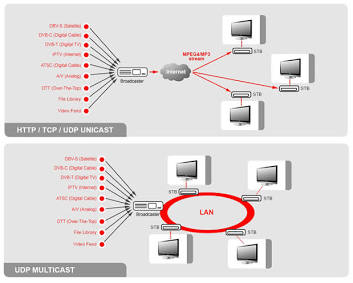
- Unicast Streaming: A dedicated point-to-point connection established between the streaming server and your specific device. Every user receives an independent stream. This is standard for VOD platforms (like Netflix or on-demand IPTV sections) and allows for trick-play features like fast-forwarding and rewinding.
- Multicast Streaming: Commonly used by telecom-managed IPTV operators (such as fiber-to-the-home ISP television packages). A single data stream is transmitted simultaneously to multiple client endpoints using network routers that replicate packets only when necessary. This saves massive amounts of bandwidth but requires deep cooperation between the ISP and network infrastructure.
- OTT (Over-the-Top) Streaming: Delivered over the open public internet without requiring a managed network provider. Almost all third-party commercial IPTV services operate via OTT, using standard HTTP-based protocols like HLS (HTTP Live Streaming) and MPEG-DASH.
1.2 Demystifying 4K Ultra HD Specifications
What does “4K” actually mean? In consumer electronics, True 4K Ultra HD (UHD) refers to a display resolution of 3840 pixels horizontally by 2160 pixels vertically. This totals approximately 8.3 million pixels—exactly four times the pixel count of standard Full HD (1920×1080).
However, resolution alone does not dictate picture quality. Consider the following crucial technical components:
- Bitrate: Measured in Megabits per second (Mbps), bitrate represents the amount of data processed per second of video. A cinematic 4K Blu-ray disc can push bitrates of 50 to 100 Mbps. In contrast, commercial IPTV services compress 4K streams down to 8 to 20 Mbps to preserve bandwidth across the public internet. If a provider compresses a 4K stream too aggressively, compression artifacts (macroblocking, banding, and pixelation) will appear, making it look worse than a clean 1080p high-bitrate stream.
- Frame Rate (FPS): Cinematic content is traditionally filmed at 24 frames per second (fps). However, live sports and fast-paced broadcasts require 50 fps or 60 fps to maintain motion clarity. If an IPTV provider labels a live sports channel as “4K” but broadcasts it at 24 fps, motion blur and stutter will render the image virtually unwatchable.
- Color Depth and Chroma Subsampling: Professional video utilizes 10-bit or 12-bit color depths, allowing for over a billion distinct color variations, virtually eliminating color banding in gradients (such as sunsets or skies). Most consumer streaming uses 4:2:0 chroma subsampling to reduce data size, which compresses color data more than brightness data.
1.3 Why the “4K” Label Can Mislead Consumers
The marketplace is saturated with services utilizing deceptive labeling. Common marketing traps include:
- The “Single Channel 4K” Illusion: A provider lists “4K” on their homepage because they feature one showcase nature documentary channel in Ultra HD, while their entire portfolio of sports, news, and entertainment channels remains capped at compressed 720p or 1080p.
- Upscaled SD/HD Content: The source feed is standard definition or 720p, but the IPTV player app or the streaming box artificially upscales the resolution to 3840×2160. While this fills the screen of a 4K television, it adds zero new detail and often amplifies compression noise.
- Hardware Incompatibility Disclaimers: A provider claims their service is 4K, but their proprietary app or portal compresses feeds server-side or lacks support for modern video decoding engines, resulting in software bottlenecks.
Chapter 2: Essential Requirements for Seamless IPTV 4K
Achieving a stable, buffer-free 4K streaming experience requires harmonizing four distinct pillars: internet bandwidth, local network hardware, streaming devices, and display technology.
+-------------------------------------------------------------------------+
|                        THE IPTV 4K ECOSYSTEM                            |
+-------------------------------------------------------------------------+
       |                         |                         |
       v                         v                         v
+--------------+          +--------------+          +--------------+
|   INTERNET   |          |    LOCAL     |          |  PLAYBACK    |
|  BANDWIDTH   |          |   NETWORK    |          |   HARDWARE   |
+--------------+          +--------------+          +--------------+
| • 25-35 Mbps |          | • Cat6 Cable |          | • 4K Android |
|   per stream |          | • Dual-Band  |          |   Box / TV   |
| • Low jitter |          |   Wi-Fi 6    |          | • H.265/HEVC |
| • Clean ping |          | • QoS Rules  |          |   Decoding   |
+--------------+          +--------------+          +--------------+
2.1 Bandwidth, Latency, and Jitter Analysis
Many users assume that if they pay for a “1 Gigabyte fiber internet connection,” their IPTV 4K stream is guaranteed to be flawless. This is a dangerous misconception. While raw download speed is important, network stability parameters dictate real-world streaming performance:
- Minimum Sustained Bitrate: For a compressed 4K IPTV stream (encoded in HEVC/H.265), you need a minimum sustained download speed of 25 to 35 Mbps dedicated exclusively to that stream. If multiple household members are streaming 4K simultaneously or downloading large files, total bandwidth requirements scale upward.
- Latency (Ping): While high latency does not directly cause buffering for pre-buffered video-on-demand, it severely disrupts live linear television streams and electronic program guide (EPG) synchronization. Ideal latency to IPTV edge servers should remain under 50 milliseconds.
- Jitter and Packet Loss: Jitter is the variance in packet arrival time. High jitter causes micro-stutters and audio-video desynchronization. Packet loss (even as low as 1-2%) forces TCP retransmissions, resulting in immediate freezing, audio dropouts, or encoder crashes.
2.2 Local Network Optimization: Wi-Fi vs. Ethernet
Wireless networking has evolved significantly with Wi-Fi 5, Wi-Fi 6, and Wi-Fi 6E, yet wireless signals remain vulnerable to physical interference that can disrupt IPTV 4K playback. Walls, microwave ovens, Bluetooth devices, neighboring router channels, and distance all degrade the Wi-Fi throughput required for stable IPTV 4K streaming. Optimizing your wireless setup or switching to a wired connection is essential to prevent buffering during high-bitrate IPTV 4K broadcasts and enjoy uninterrupted IPTV 4K picture quality.
Golden Rule of 4K Streaming: If physical wiring is possible, always connect your IPTV streaming device directly to your router using an Ethernet cable (Cat5e or Cat6).
If you must use Wi-Fi, observe these optimization protocols:
- Use the 5 GHz or 6 GHz Band: Avoid the congested 2.4 GHz band, which suffers from extreme interference and limited bandwidth capacity.
- Clear Line of Sight: Ensure your streaming device and wireless router have an unobstructed line of sight or minimal wall obstruction.
- Quality of Service (QoS): Access your router’s administrative dashboard and enable QoS settings to prioritize media streaming traffic over background downloads or file sharing.
2.3 Choosing the Right Playback Hardware

Not all streaming devices are created equal. Trying to run a high-bitrate 4K IPTV stream on an outdated Smart TV operating system or a cheap, uncertified streaming stick is a recipe for frustration.
- Dedicated Streaming Media Players: Devices like the NVIDIA Shield TV Pro, Apple TV 4K, and high-end Google TV / Android TV boxes feature powerful multi-core processors, dedicated graphics chips, and robust cooling systems capable of handling heavy video decoding loads.
- Codec Support (HEVC/H.265 and AV1): Ensure your hardware natively supports hardware-accelerated decoding for HEVC (H.265). Most 4K IPTV streams are encoded using HEVC because it offers double the data compression efficiency of older H.264 codecs without sacrificing visual fidelity. Without hardware decoding, the device’s CPU will overheat, throttle, and drop frames.
- RAM and Storage: Look for devices with at least 2GB to 4GB of RAM and sufficient internal storage to cache EPG data and application logs without lagging.
Chapter 3: Evaluating and Selecting a Reliable IPTV 4K Provider
Navigating the commercial IPTV 4K market requires skepticism, research, and structured evaluation. Because many unauthorized or gray-market IPTV 4K providers operate online, consumers must protect themselves from scams, sudden service shutdowns, and poor technical support when subscribing to any IPTV 4K package. Furthermore, staying vigilant against recurring billing traps is essential for securing a safe and reliable IPTV 4K streaming experience.
3.1 Vetting Official Provider Websites and Infrastructure
Legitimate, high-tier streaming services maintain professional digital footprints. When researching a provider, examine the following indicators:
- Transparent Service Specifications: Does the provider explicitly state which channels are broadcast in native 4K versus upscaled HD? Do they list supported applications (e.g., TiviMate, IPTV Smarters Pro, IBO Player)?
- Customer Support Channels: Look for responsive support ticketing systems, detailed FAQ knowledge bases, and community forums. Avoid providers that rely solely on anonymous Telegram channels or disposable email addresses.
- Secure Payment Gateways: Reputable services use encrypted checkout procedures and accepted commercial payment methods. Be extremely cautious of platforms demanding cryptocurrency or untraceable wire transfers for multi-year subscriptions.
3.2 Analyzing Trial Offers and Subscription Terms
As explored in introductory guides, never commit to a 12-month subscription without rigorous testing. When evaluating trial offers:
- Check Trial Limitations: Determine whether the trial is a full-featured pass or a restricted test. Ensure 4K channels are accessible during the trial period.
- Scrutinize Auto-Renewal Policies: Read the fine print regarding payment information requirements. Many services enroll trial users into recurring monthly billing automatically. Set calendar reminders to cancel before the trial expires if the service does not meet your standards.
- Examine Refund Guarantees: Look for clear, enforceable money-back policies (e.g., a 7-day refund window) in case server performance degrades after initial signup.
Chapter 4: Step-by-Step Setup Guide for IPTV 4K Applications
Once you have selected a reliable provider and secured your trial or subscription, configuring your playback environment correctly is essential for optimal performance.
4.1 Selecting the Ideal IPTV Player App
While many providers supply their own branded APKs, third-party media players offer vastly superior performance, electronic program guide (EPG) management, and playback customization.
- TiviMate (Android TV / Fire TV): Widely regarded as the gold standard for IPTV playback. It features a modern television-guide interface, multi-playlist support, catch-up capabilities, custom grouping, and advanced buffer size adjustments.
- IPTV Smarters Pro (Cross-Platform): Available across Android, iOS, Windows, and smart TV app stores. Excellent for beginners due to its intuitive layout and support for Xtream Codes API login.
- IBO Player / XCIPTV: Popular lightweight alternatives offering robust hardware acceleration and clean user interfaces.
4.2 Configuring Advanced App Settings for 4K Playback

To prevent stuttering and maximize visual fidelity, adjust these specific settings within your chosen IPTV player:
- Decoder Selection: Set the video decoder to Hardware (HW) or HW+ rather than Software (SW). This offloads decoding tasks from the device CPU to the dedicated GPU video processor.
- Buffer Size Adjustments: If your connection experiences minor fluctuations, increase the buffer size setting from “Small” or “None” to “Large.” This pre-loads several seconds of video data, smoothing out micro-drops in speed.
- EPG Update Frequency: Schedule Electronic Program Guide updates during off-peak hours (e.g., 4:00 AM) to prevent background data fetching from interfering with evening viewing sessions.
- Audio Passthrough: If you use an external soundbar or home theater AV receiver, enable audio passthrough for Dolby Digital, DTS, or Dolby Atmos to ensure pristine multi-channel sound accompanies your 4K video.
Chapter 5: Advanced Troubleshooting for 4K Buffering, Lag, and Picture Defects
Even with a top-tier setup, occasional streaming anomalies can occur. Systematic troubleshooting isolates the root cause and restores optimal performance.
+-------------------------------------------------------------------------+
|                      TROUBLESHOOTING DECISION TREE                      |
+-------------------------------------------------------------------------+
                                    |
                        Is the issue global or local?
                                    |
         +--------------------------+--------------------------+
         |                                                     |
         v                                                     v
+------------------------+                           +------------------------+
|   LOCAL ISSUE          |                           |   PROVIDER ISSUE       |
| (One channel / Device) |                           | (All channels / Down)  |
+------------------------+                           +------------------------+
| • Restart router/box   |                           | • Check status page    |
| • Switch to Ethernet   |                           | • Switch stream format |
| • Clear app cache      |                           | • Contact support      |
| • Verify HDMI 2.0/2.1  |                           | • Wait for CDN fix     |
+------------------------+                           +------------------------+
5.1 Diagnosing and Resolving Buffering During Peak Hours
If your 4K stream runs flawlessly at 2:00 PM on a Tuesday but buffers relentlessly at 9:00 PM on a Saturday, you are experiencing network congestion.
- ISP Throttling: Some internet service providers detect high-bandwidth streaming traffic and artificially throttle connection speeds to IPTV servers. Solution: Utilize a reputable, high-speed Virtual Private Network (VPN) with WireGuard protocols to encrypt your traffic and bypass ISP throttling.
- Server Overload: If the IPTV provider’s edge servers are oversubscribed during major live sports events, even a 1-Gigabit home connection will buffer. Solution: Switch to an alternate server URL/group provided in your portal, or report the issue to provider support.
5.2 Resolving Picture Quality Issues (Soft Image, Color Banding, Stuttering)
- HDMI Handshake and Cable Integrity: Ensure you are using certified High-Speed or Ultra High-Speed HDMI 2.0 / 2.1 cables plugged into HDCP 2.2 compliant ports on your television. Cheaper or damaged cables cannot transmit full 4K 60fps HDR signals, resulting in fallback resolution drops or black screens.
- Motion Interpolation Settings: Turn off aggressive motion smoothing features on your television (e.g., TruMotion, Motionflow). These settings introduce artificial soap-opera effects and conflict with variable frame rate IPTV streams, causing jitter and stutter.
- Color Space Matching: Configure your streaming box output to match dynamic range and color space automatically (e.g., setting color space to YCbCr 4:4:4 or RGB High depending on display capabilities).
Chapter 6: Legal, Ethical, and Privacy Considerations in IPTV Streaming
As a responsible consumer, navigating the complex legal landscape of digital television distribution is paramount.
6.1 Understanding Content Licensing and Copyright
Television broadcasting rights are strictly regulated by geographic territories, especially when it comes to high-demand IPTV 4K broadcasts. A network holding exclusive rights to distribute a premier league football match in North America cannot legally transmit that exact IPTV 4K feed into European or African markets without regional licensing agreements.
Many commercial IPTV 4K services operate in a legal gray area, aggregating global channels without holding direct retransmission consent from original copyright holders. Consumers should research local telecommunications laws and prioritize services that demonstrate clear compliance, transparent business identities, and legitimate content sourcing.
6.2 Protecting Your Digital Privacy and Account Security
When interacting with digital subscription services, safeguarding your personal data is essential:
- Never Share Credentials: Avoid logging into untrusted or unverified third-party web portals that claim to offer “free playlist generators,” as these are often credential-harvesting phishing scams.
- Use Strong, Unique Passwords: Combine alphanumeric characters and symbols for your IPTV account login to prevent unauthorized multi-device sharing or credential stuffing attacks.
- Secure Payment Practices: Use virtual credit card numbers or trusted payment processors where available to shield your primary banking details from potential vendor data breaches.
Conclusion: Making the Informed Choice for Your Household
Choosing an IPTV 4K service is an exercise in balancing technical capability, financial value, and content preference. By looking past flashy marketing slogans, understanding the rigorous demands of IPTV 4K bitrate transmission, optimizing your home networking hardware, and thoroughly evaluating providers through structured trials, you can build a robust, cinematic home entertainment system.
Whether you are streaming live global sports, catching up on multi-season television epics, or enjoying weekend movie nights with a reliable IPTV 4K setup, knowledge is your greatest asset. Test thoroughly, configure wisely, and enjoy the future of IPTV 4K entertainment on your own terms.