IPTV 4K: The Ultimate Masterclass to Ad-Free Streaming, Cost Optimization, and Commercial-Free Entertainment
Introduction: The Promise vs. Reality of Ad-Free Streaming
A commercial break can land right when a mystery is about to be solved or a film reaches its best scene. Opting for ad free streaming promises to eliminate those interruptions, creating a seamless, cinema-like viewing session right from your living room.
However, ad free streaming does not mean the same thing on every service, as the label can sometimes be misleading. Choosing the right plan for genuine ad free streaming requires looking far beyond the absence of traditional commercials.
You must evaluate the true monthly cost, the shows and films you actually watch, device compatibility, and whether live broadcasts or specific library titles still include advertisements. Ultimately, doing a few targeted checks before entering your payment details can help you find legitimate ad free streaming options, compare plan rules accurately, and prevent surprise recurring charges.
Chapter 1: What Ad-Free Streaming Really Includes
An ad-free subscription tier removes traditional commercial breaks from the vast majority of a platform’s on-demand library. Yet, important technical and licensing exceptions remain.
1.1 On-Demand Viewing Without Commercial Breaks
With ad free streaming, on-demand platforms let you select a specific show, documentary, or movie and play it whenever you choose. Utilizing a verified ad free streaming tier ensures that episodes and feature films play continuously from start to finish without mid-roll commercial interruptions.
This experience contrasts sharply with Free Ad-Supported Streaming TV, widely known as FAST. Whereas traditional ad free streaming requires a paid subscription, FAST platforms deliver scheduled linear channels and on-demand titles at zero direct cost, relying entirely on mandatory commercial breaks to fund content licensing.
1.2 Live Events and Broadcast Exceptions
A subscription plan marketed as ad free streaming will almost always display commercials during live sports, breaking news, and live award broadcasts.
Because these programs are transmitted directly from live television broadcast feeds, commercials are embedded into the stream itself, meaning even the highest tier of ad free streaming cannot strip commercials out of a live sporting event.
1.3 Platform Promos and Product Placements
Even on top-tier commercial-free plans, viewers frequently encounter non-traditional promotions:
- Pre-Roll Trailers: Many platforms play short previews for their own upcoming original series before your selected movie starts.
- Sponsorship Overlays: Live events and select network programs feature on-screen sponsor banners or brief verbal sponsor mentions.
- In-Content Product Placement: Brands pay studios directly to feature products inside scenes, which remain visible regardless of your subscription tier.
1.4 Regional Licensing and Add-On Exclusions
Content rights vary drastically across international borders when it comes to ad free streaming. A show that streams completely commercial-free in one country may carry ads or be unavailable in another due to local distribution contracts.
Furthermore, subscribing to third-party channel add-ons (such as live sports networks or specialty cable channels inside a primary streaming app) often introduces separate ad rules that override your base ad free streaming plan.
Chapter 2: How to Choose an Ad-Free Streaming Plan
The best streaming plan is the one aligned with your household’s actual viewing habits, rather than the service with the flashiest marketing campaign.
2.1 Audit What Your Household Actually Watches
Before comparing ad free streaming prices, write down the exact shows, film genres, and live sports your household watches regularly.
Check each ad free streaming provider’s official catalog on their website to verify that those titles are currently available in your region. Licensing agreements expire constantly, meaning a show available last month on one ad free streaming service may have moved to a competing platform.
2.2 Check Episode Release Schedules
Pay close attention to how your favorite series are released:
- Full-Season Drops: Ideal for subscribing for a single month, binge-watching the entire series commercial-free, and canceling immediately afterward.
- Weekly Episode Releases: Keeping an expensive ad-free subscription active for three months just to watch one 45-minute episode per week results in poor value per dollar spent.
2.3 Compare the Full Monthly Cost
Ad free streaming prices across major platforms have climbed steadily, making careful cost comparison essential. Compare the ad free streaming plan price directly against the ad-supported tier, factoring in any required add-ons.
| Plan Feature | Ad-Supported Tier | Standard Ad-Free Tier | Premium 4K Ad-Free Tier |
| Commercial Breaks | Frequent pre-roll & mid-roll ads | None on on-demand titles | None on on-demand titles |
| Video Resolution | Typically 1080p Full HD | 1080p Full HD | 4K Ultra HD + HDR |
| Simultaneous Streams | Usually 1 to 2 screens | Typically 2 screens | Up to 4 screens |
| Offline Downloads | Usually disabled | Supported on mobile/tablets | Supported with higher limits |
| Monthly Cost Impact | Lowest entry price | Moderate price jump | Highest monthly commitment |
Always calculate the final post-tax price. Regional digital taxes and municipal entertainment fees can add several dollars to your monthly bill beyond the advertised base rate.
2.4 Verify Screens, Downloads, and Technical Specs
An ad-free label does not automatically guarantee top-tier audio or video performance. Before paying, confirm these three technical specifications:
- Concurrent Stream Limits: Ensure the plan allows enough simultaneous streams so family members are not locked out during peak evening hours.
- Offline Download Permissions: If you commute or travel by air, confirm that the plan permits downloading episodes to phones or tablets for offline playback.
- 4K HDR & Spatial Audio: Many services reserve 4K Ultra HD, Dolby Vision, and Dolby Atmos exclusively for their highest-priced ad-free tiers, keeping standard ad-free plans capped at 1080p.
Chapter 3: Where to Find Legitimate Ad-Free Streaming
Paid monthly subscriptions are the most visible path to commercial-free entertainment, but smart viewers combine paid tiers with zero-cost institutional resources and promotional bundles.
3.1 Major Paid Ad-Free Streaming Services
Leading platforms—including Netflix, Disney+, Hulu, HBO Max, Prime Video, and Apple TV—all offer commercial-free viewing options, though their structures differ significantly:
- Standalone Ad-Free Tiers: Services like Netflix and HBO Max separate their tiers by both ad removal and video resolution (1080p vs. 4K).
- Ad-Free Add-On Fees: Platforms such as Prime Video include baseline video access with standard memberships, but require an additional monthly fee to remove commercial breaks from movies and shows.
- All-Ad-Free Platforms: Services like Apple TV operate exclusively without commercial breaks across their original catalog, including 4K HDR and Dolby Atmos by default.
3.2 Library-Based Services With Zero Commercials
Public libraries and universities fund legitimate, completely free streaming platforms that contain zero commercials:
- Kanopy: Partnered with thousands of public libraries and academic institutions worldwide, Kanopy offers over 30,000 critically acclaimed indie films, classic cinema, world cinema, documentaries, and educational series (Kanopy Kids) without a single ad.
- Hoopla: Connects directly to participating local library cards, allowing patrons to stream and download movies, television episodes, audiobooks, and music instantly with zero commercial interruptions.
To access either service, visit your local public library’s website, verify your library card number, and link your account. Monthly borrowing limits or ticket allocations apply depending on your library’s funding.
3.3 Telecom Bundles, Carrier Perks, and Trials
You can dramatically reduce the cost of ad-free streaming by leveraging existing household bills:
- Mobile Carrier Perks: Major wireless providers frequently include discounted or complimentary streaming subscriptions within unlimited data plans.
- Multi-Service Bundles: Combining services—such as Disney+, Hulu, and HBO Max bundles—reduces the combined monthly total compared to paying for three standalone ad-free accounts.
- Credit Card Statement Credits: Select rewards credit cards offer monthly statement credits specifically designated for digital streaming subscriptions.
Chapter 4: How to Avoid Surprise Ads, Fees, and Renewals
Subscription fatigue happens when forgotten trials, auto-renewals, and silent price increases drain your bank account each month.
4.1 Read Plan Terms Before Subscribing

Spend two minutes reviewing the provider’s official ad free streaming plan comparison page and help center before entering your payment details. Many billing surprises and unexpected commercial breaks during ad free streaming happen simply because important restrictions are tucked away in small footnotes rather than the main pricing banner.
- Promotional Duration Limits: Verify whether an advertised discount applies for a single billing cycle, three months, or an entire year. Introductory offers often look cheap upfront but double in price the moment the promotional window closes.
- Standard Renewal Pricing: Check the exact standard monthly or annual renewal rate that takes effect once a free trial or discounted period ends. Note whether regional taxes or digital service fees will be added on top of that base figure.
- Live Content and Add-On Exemptions: Confirm whether live television channels, sports packages, or third-party network add-ons inside the app are exempt from ad-free rules. Even on top-tier commercial-free plans, live feeds and partner channels frequently retain mandatory commercials.
- Device and Resolution Caps: Ensure the specific tier you select actually supports your home hardware, including 4K Ultra HD streaming, simultaneous household screens, and offline mobile downloads.
- Cancellation and Refund Rules: Check how far in advance you must cancel before your next billing date—some providers require cancellation at least 24 hours before renewal—and verify whether partial-month refunds are ever granted.
4.2 Master Subscription Tracking and Cancellations
Keep a simple, centralized record of every active streaming subscription in a notes app or spreadsheet. Include four details for each service:
- Service Name & Tier (e.g., Standard Ad-Free)
- Monthly or Annual Cost
- Exact Billing Renewal Date
- Billing Platform (Direct website, Apple App Store, Google Play, or Roku/Amazon)
If you signed up through an app store or smart TV platform, you must cancel directly inside that platform’s subscription settings menu—deleting the app from your screen does not cancel your billing.
4.3 Use Prepaid Cards to Cap Spending
If you want strict protection against unexpected price hikes, forgotten free trials, or unwanted auto-renewals, you can secure your ad free streaming by paying for your services using prepaid streaming gift cards or virtual single-use debit cards.
Using this payment method for ad free streaming ensures that once the loaded balance runs out, the subscription pauses automatically without ever touching your primary bank account or personal credit card.
This approach is an excellent way to maintain ad free streaming without the risk of surprise charges, allowing you to enjoy uninterrupted entertainment on your own terms.
Easy Gift Card Discounts: Warehouse clubs, grocery stores, and online retailers frequently run promotions offering 10% to 15% off streaming gift cards, allowing you to stack extra savings onto your ad-free entertainment budget.
Hard Budget Enforcement: Loading a fixed amount—such as $30 or $50—onto a platform-specific gift card (like Netflix, Hulu, Apple, or Google Play cards) creates an automatic spending ceiling. You never have to worry about a forgotten subscription quietly draining your checking account month after month.
Zero-Risk Trial Testing: Many streaming providers require a valid payment method before unlocking a free trial. Using a virtual prepaid card with a low balance satisfies the signup requirement while ensuring you cannot be billed full price if you forget to cancel on time.
Protection Against Silent Price Hikes: When a provider raises its monthly subscription rate, a traditional credit card absorbs the higher charge automatically. With a prepaid card, the increased fee simply exhausts your remaining balance slightly earlier, prompting you to consciously decide whether the service is still worth renewing.
4.4 Avoid Unofficial Sites and Pirated Workarounds
Unofficial streaming websites and unauthorized ad-blocking APKs promise free, commercial-free access to paid content, but they carry severe risks:
- Cybersecurity Threats: Unlicensed portals frequently inject malware, trojans, and aggressive phishing pop-ups onto your devices.
- Account Suspension: Using third-party browser extensions or modified apps to bypass ads on legitimate platforms violates terms of service and can result in permanent account bans.
- Unreliable Quality: Pirated streams suffer from low bitrates, broken audio sync, missing subtitles, and sudden mid-movie takedowns.
Chapter 5: Build an Ad-Free Streaming Setup Around Your Habits
You do not need to pay for five or six ad-free subscriptions simultaneously every month of the year. Strategic planning lets you enjoy uninterrupted entertainment on a modest budget.
5.1 Practice Subscription Rotation (“Churning”)
Subscription rotation is the single most effective strategy for cutting streaming costs by over 50%:
- Pick One Primary Service: Subscribe to one ad-free service that currently holds the shows or films you want to watch most.
- Cancel Immediately After Subscribing: On most platforms, canceling immediately after paying lets you keep full ad-free access for the remainder of your 30-day billing cycle while guaranteeing you will not be billed automatically next month.
- Rotate Next Month: Once your 30 days end, switch to a different streaming platform for the next month.
Most major services preserve your user profiles, watchlists, and viewing history for several months after cancellation, making it effortless to jump back in later.
5.2 Configure a Household-Friendly Setup
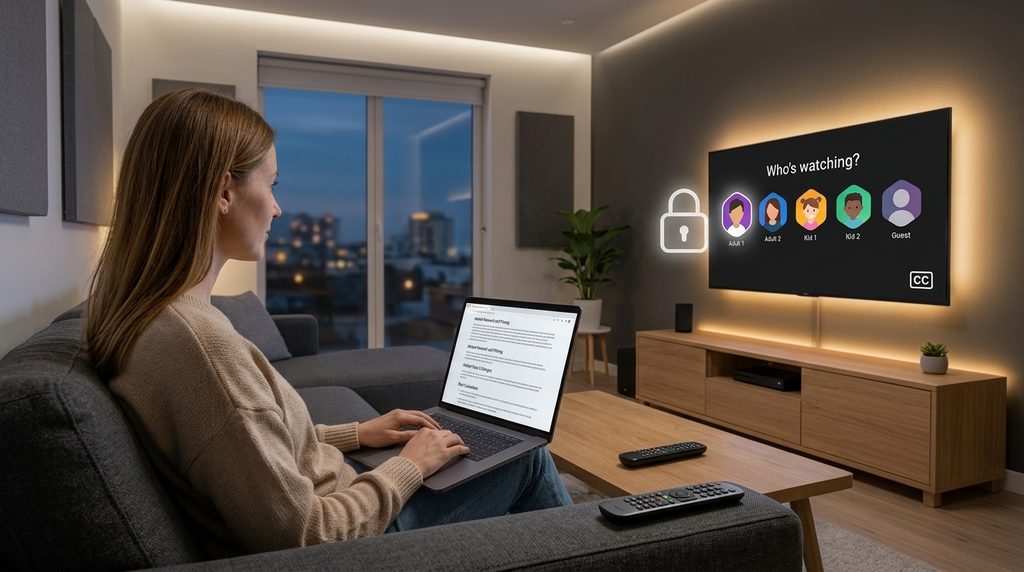
When multiple people share one account, proper configuration prevents frustration and accidental upgrades:
- Dedicated Profiles: Create individual profiles for every household member so algorithms stay accurate and watchlists do not collide.
- PIN Protection on Purchases: Set a profile PIN or purchase lock on your smart TV apps so children or guests cannot accidentally upgrade tiers or rent pay-per-view movies.
- Accessibility Settings: Confirm that subtitles, closed captions, and audio descriptions work reliably across your living room TV, tablets, and phones.
5.3 Reassess Whether Ad-Free Is Worth the Extra Cost
Conduct a quick value check every few months, especially when providers announce price increases:
- Heavy Viewers: If your household streams two or more hours daily, paying an extra $5 to $10 per month to eliminate commercial interruptions delivers high value per hour watched.
- Casual Viewers: If you only watch two or three movies a month, downgrading to an ad-supported tier—or relying on free library platforms like Kanopy and Hoopla—frees up significant money for other priorities.
Conclusion: Make Ad-Free Streaming Work for Your Budget
The ideal ad free streaming setup balances uninterrupted viewing pleasure with disciplined monthly spending. By understanding what the ad free streaming label truly covers, verifying live broadcast exceptions, and matching plan features to your household’s actual screen needs, you avoid paying for bloated tiers you never fully utilize.
Take ten minutes today to audit your active subscriptions. Cancel unused services, explore free library-linked platforms like Kanopy and Hoopla, and adopt a monthly rotation schedule so you only pay for ad free streaming when you are actively watching it.
Frequently Asked Questions (FAQs)
1. Why do I still see ads on an ad-free streaming plan?
Ad-free tiers only remove commercials from on-demand movies and TV shows. Live sports, live news channels, special broadcast events, and certain third-party channel add-ons still include commercials embedded in their live feeds.
2. Is it legal to use library apps like Kanopy and Hoopla for free ad-free movies?
Yes. Kanopy and Hoopla are 100% legal, licensed streaming platforms funded directly by public libraries and universities for their cardholders.
3. Does canceling a streaming subscription delete my watchlist?
No. Almost all major ad free streaming services store your user profiles, viewing history, and saved watchlists for several months after you cancel your membership. If you decide to reactivate your ad free streaming account later, your personalized recommendations and saved titles are restored automatically.
Resuming Where You Left Off: Because your watch progress remains saved in the cloud, you can safely rotate ad free streaming subscriptions month to month without losing track of which episode or timestamp you stopped watching.
Retention Windows Vary by Provider: Most leading ad free streaming platforms preserve account data for anywhere between 3 to 12 months following cancellation. For example, services like Netflix typically hold your viewing activity and profile settings for up to 10 months before permanently clearing inactive data.
Cancel vs. Delete Account: There is a major difference between canceling an ad free streaming subscription and permanently deleting your account. Clicking “Cancel Membership” simply stops recurring monthly billing while keeping your login credentials and lists intact. Choosing “Delete Account” in your privacy settings permanently erases all data immediately.
Offline Downloads Are Removed: While your cloud-based watchlist stays safe, any movies or episodes downloaded to your phone or tablet for offline viewing will expire and become unplayable once your final paid billing cycle ends.
4. Why are 4K and HDR locked behind the most expensive ad-free plans?
Streaming providers bundle high-bandwidth technical features—like 4K Ultra HD, Dolby Vision, Dolby Atmos, and four simultaneous streams—into their top tiers to justify higher monthly pricing.
5. What is the easiest way to stop forgetting about free trial renewals?
Cancel the trial immediately after signing up. On nearly all platforms, you will retain full access until the final day of the trial period without risking an automatic charge when the clock runs out.