Choosing an IPTV Provider in the UK: An Honest, Real-World Guide for 2026
Walk down any terraced street in Manchester, peer into a new-build flat in Leeds, or chat with neighbours over the garden fence in Bristol, and you will notice something missing from the rooftops. The old metal aerials and grey satellite dishes that defined British television for decades are quietly disappearing. In their place, families are plugging small streaming boxes into the back of their tellies and relying on an iptv provider to deliver everything from the six o’clock news to Saturday afternoon football.
Making the jump from traditional broadcasting to internet television sounds simple on paper, yet the reality can feel like walking through a minefield. Search online for an iptv provider in Britain right now and you are immediately hit with two wildly different worlds. On one side sit the established, household-name broadcasters offering slick, fully licensed streaming boxes; on the other sit thousands of shadowy social media sellers promising every channel on earth for the price of a couple of pints.
If you have been thinking about ditching your old satellite contract or setting up a telly in a flat with no aerial socket, you need clear, practical answers rather than sales jargon. Over the next few thousand words, we are going to strip back how internet television actually works in British homes, what the law really says, how much you should expect to pay in 2026, and how to pick an iptv provider that will not leave you staring at a spinning loading wheel ten minutes before kick-off.
Why British Households Are Ditching Dishes and Aerials
For years, getting decent television in the UK meant accepting a rigid compromise before switching to an iptv provider became a mainstream option. You either put up with whatever channels your rooftop aerial could pick up on a rainy Tuesday, or you signed an eighteen-month contract with a major satellite or cable company, waited three weeks for an engineer to drill holes through your brickwork, and braced yourself for inevitable price rises every April.
Working with a modern iptv provider flips that entire arrangement on its head. Because the television signal arrives down the exact same fibre or copper broadband line you use for checking emails and scrolling on your phone, you no longer need a dish bolted to the outside wall or a coax cable snaking behind the sofa. For millions of renters across London, Birmingham, and Edinburgh—where landlords strictly forbid external dishes—internet-based television is often the only way to get a full channel lineup.
Even homeowners with perfectly good aerials are making the switch because traditional broadcast infrastructure is showing its age. High winds still knock aerials out of alignment, heavy summer rainstorms still wipe out satellite signals, and terrestrial transmitters simply do not have the bandwidth to carry dozens of Ultra HD channels. A reliable iptv provider bypasses atmospheric interference completely, delivering crisp 1080p and native 4K streams regardless of what the British weather is doing outside.
What an IPTV Provider Actually Does Behind the Scenes
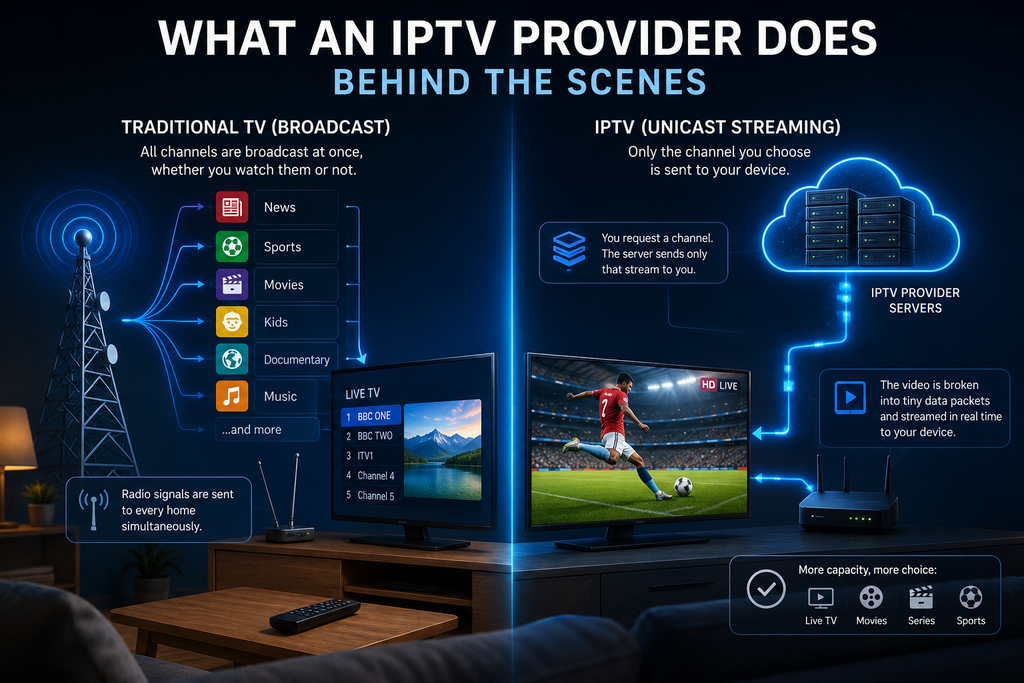
When you press a button on a traditional Freeview remote, your telly is simply tuning into a radio frequency being blasted out across your entire region from a local transmitter mast. Every single channel is arriving at your aerial simultaneously, whether you are watching it or not.
An iptv provider operates on a completely different principle called unicast streaming. Instead of broadcasting a hundred channels to your living room at once, their servers sit quietly until you click on a specific programme. The moment you select BBC One or a live Champions League match, your streaming device sends a tiny digital request up your broadband line to the server.
That server immediately grabs the live video feed, slices it into thousands of microscopic data packets, and fires them back down your internet connection to be reassembled on your screen in real time. Because an iptv provider only sends the exact stream you asked for, their network can carry vastly more on-demand box sets, live sports feeds, and high-definition channels than any old-fashioned aerial could ever handle.
The Role of Content Delivery Networks (CDNs)

Have you ever wondered why Netflix loads in two seconds flat while a poorly built website takes ages? The secret lies in Content Delivery Networks, or CDNs. Any serious iptv provider invests heavily in placing high-speed cache servers inside UK data centres—usually in London Docklands, Manchester, or Slough—so the video data only has to travel a few dozen miles to reach your router.
When a budget operator tries to cut corners by hosting their streams on cheap servers in Eastern Europe or North America, every single packet of video has to cross undersea cables and pass through dozens of congested internet junctions. That extra distance creates latency, dropped frames, and the dreaded buffering circle during peak evening viewing hours.
The Great Divide: Licensed Broadcasters vs. Grey-Market Sellers
Before you hand over a single pound or enter your card details anywhere, you have to understand the sharpest dividing line in British television. The term iptv provider is used to describe both multi-billion-pound UK telecom giants and anonymous operators running Telegram channels out of spare bedrooms.
Official, Licensed UK Platforms
Technically speaking, Sky Stream, Virgin Media Stream, EE TV, NOW, and Freely are all internet television platforms. Every time you open BBC iPlayer or ITVX on a smart TV, you are using internet protocol television. Each licensed iptv provider negotiates directly with rights holders—such as the Premier League, UEFA, HBO, and Hollywood studios—paying hefty licensing fees to distribute those broadcasts legally across Britain.
In return for paying official subscription rates, you get rock-solid reliability, dedicated customer support, 5.1 surround sound, accurate subtitles, and zero risk of your service vanishing overnight.
Unverified “Everything for £10” Subscriptions
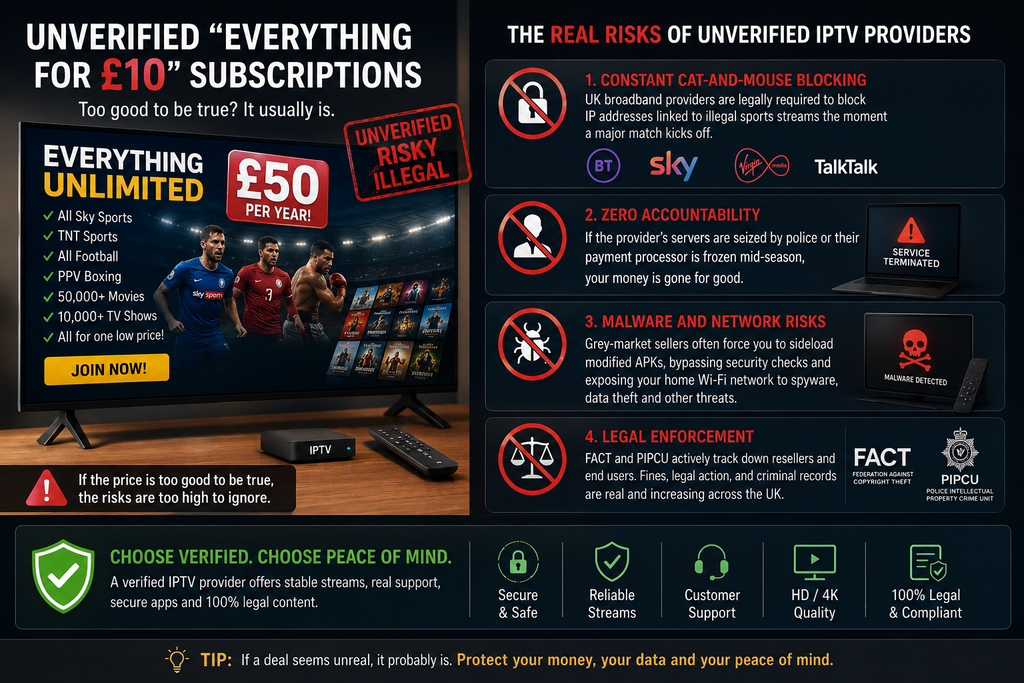
Spend five minutes on Facebook Marketplace, TikTok, or Reddit, and you will stumble across adverts claiming you can get every Sky Sports channel, TNT Sports, Saturday 3:00 PM kick-offs, pay-per-view boxing, and fifty thousand movies for £50 a year. An unverified iptv provider achieves those rock-bottom prices by tapping into legitimate broadcasts, stripping away the encryption, and restreaming the raw feeds over private servers without paying a penny to the copyright owners.
While the low price tag tempts thousands of cash-strapped households every month, these grey-market operations come with serious catches that rarely get mentioned in the sales pitch:
- Constant Cat-and-Mouse Blocking: UK broadband companies—including BT, Sky, Virgin Media, and TalkTalk—are legally bound by High Court injunctions to block IP addresses linked to illegal sports streams the moment a major match kicks off.
- Zero Accountability: If an unverified iptv provider has their servers seized by police or their payment processor frozen mid-season, your annual subscription money is gone for good.
- Malware and Network Risks: Many grey-market sellers force you to sideload modified Android APK files onto your streaming stick, bypassing Google and Amazon security checks and potentially exposing your home Wi-Fi network to spyware.
- Legal Enforcement: Organisations like FACT (Federation Against Copyright Theft) and the Police Intellectual Property Crime Unit (PIPCU) actively track down resellers and have increasingly issued cease-and-desist notices and fines to end users caught streaming pirated broadcasts.
Comparing the Top Legitimate UK IPTV Providers in 2026
If you want a smooth, completely legal living room setup without an aerial or dish, the UK market offers stronger choices right now than ever before. Depending on whether you watch mostly free terrestrial telly or follow every weekend of the football season, one specific iptv provider will usually stand out for your budget.
| UK IPTV Provider | Delivery Hardware | Monthly Cost (Approx.) | Contract Terms | Key Strengths |
| Freely | Built into new smart TVs | £0 (TV Licence required) | No contract | Free live BBC, ITV, Channel 4 & 5 over Wi-Fi |
| Sky Stream | Sky Stream Puck | From £15 – £26/mo | 31-day rolling or 24-mo | Best unified interface, Sky Atlantic & Netflix included |
| NOW | Any smart TV, stick, or console | From £4.99 – £34.99/mo | Monthly or Day Passes | Zero hardware lock-in; great for flexible sports passes |
| Virgin Media Stream | Virgin Stream Box | £0 base + channel packs | 30-day rolling | 10% credit back on subscriptions; neat compact box |
| EE TV | EE TV Box Pro / Apple TV 4K | From £18/mo (with EE BB) | 24-month broadband term | Easy monthly swaps between TNT Sports & NOW |
| TalkTalk TV Hub | Android-powered TV Hub | From £5/mo (with TalkTalk) | Monthly rolling | Budget-friendly Google TV box with Freeview apps |
Freely: The Aerial Replacement Britain Needed
Launched by Everyone TV—the joint venture backed by the BBC, ITV, Channel 4, and Channel 5—Freely has rapidly become the go-to free iptv provider for anyone buying a new television. Built directly into smart TVs from Hisense, Panasonic, Bush, Toshiba, and Sharp, it lets you flick through live British channels using a familiar electronic programme guide purely over your home Wi-Fi. You can pause live broadcasts, restart shows from the beginning if you missed the opening ten minutes, and jump straight into catch-up box sets without ever touching an aerial cable.
Sky Stream: The Full Living Room Experience Without the Dish
For households that love Sky’s sleek interface, curated recommendations, and exclusive drama channels like Sky Atlantic, Sky Stream removes the last barrier to entry. Instead of an engineer climbing a ladder outside your house, DPD drops a palm-sized puck through your letterbox. Plug it into an HDMI port, connect to your router, and you have an iptv provider that blends live channels, Netflix, Disney+, Apple TV+, and BBC iPlayer into a single search bar. Paying a few pounds extra for the 31-day rolling contract also gives you freedom to cancel during quieter summer months.
NOW: Maximum Flexibility for Sports and Box-Set Fans
Not everyone wants another black box cluttering up the TV stand. Operating as Sky’s contract-free digital arm, NOW works as an app-based iptv provider across almost every device you already own. If you only care about watching Premier League Super Sunday matches between August and May, or you just want a single month of Entertainment to binge the latest HBO thriller, NOW lets you dip in and out without long-term ties.
EE TV and Virgin Media Stream: Broadband Bundles Done Right
If you already take fibre broadband from EE or Virgin Media, adding their television bolt-ons often works out cheaper than paying for standalone apps separately. EE TV even lets you choose an Apple TV 4K as your main set-top box, giving you an iptv provider backed by telecom-grade reliability alongside Apple’s fast, ad-free hardware.
Understanding UK TV Licensing Rules for Internet Streaming
A surprising number of people assume that unplugging their rooftop aerial means they can cancel their TV Licence immediately. Under UK law, that assumption can land you with a £1,000 fine.
Whether you watch live broadcasts through an old coax cable, a satellite dish, or an iptv provider, the rule remains identical: if you watch or record television programmes as they are being broadcast live on any channel, you must hold a valid UK TV Licence. That applies to live news on Sky News, live football on TNT Sports, live broadcasts on ITVX, and even live-streamed events on YouTube.
Furthermore, watching any on-demand programme on BBC iPlayer legally requires a TV Licence, regardless of whether the show aired ten minutes ago or ten years ago. The only way you can legally go without a licence in Britain is if you never watch live TV on any platform, never touch BBC iPlayer, and stick strictly to on-demand catalogues like Netflix, Disney+, Prime Video, or Channel 4 catch-up. Keep this in mind when budgeting for your iptv provider, as the £180 annual licence fee is part of the baseline cost for live British telly.
How Much Broadband Speed Do You Actually Need?
Broadband sales reps love convincing families that they need 900 Mbps full-fibre packages just to watch television without stuttering. In truth, modern video compression codecs—specifically HEVC (H.265) and AV1—have dramatically shrunk the amount of data an iptv provider needs to send down your line.
Here is what a single video stream actually consumes in real-world testing:
- Standard Definition (480p): Roughly 3 to 5 Mbps
- Full High Definition (1080p at 50fps): Roughly 10 to 15 Mbps
- 4K Ultra HD with HDR & Dolby Atmos: Roughly 25 to 35 Mbps
On paper, a basic 35 Mbps Fibre-to-the-Cabinet (FTTC) connection can handle a single 4K stream. The trouble starts at 8:15 PM on a Wednesday night when one person is watching a Champions League match in 4K, someone else is scrolling TikTok in the bedroom, and a gaming console in the spare room starts downloading a massive patch.
To give your iptv provider enough breathing room so picture quality never drops down to blurry standard definition, aim for a broadband connection of at least 65 Mbps to 100 Mbps. More importantly than raw download speed, look for a provider with low ping (latency) and minimal packet loss, as sudden spikes in latency cause live streams to pause and re-buffer.
Choosing the Best Streaming Hardware for Your Living Room
You could subscribe to the most reliable iptv provider in the country, yet still suffer sluggish menus, audio delays, and random app crashes if you rely on the built-in software inside a cheap supermarket smart TV. Television manufacturers pack budget panels with underpowered processors and tiny amounts of RAM, which start choking after two years of software updates.
Spending £40 to £150 on a dedicated streaming device transforms how responsive your television feels:
1. Apple TV 4K (3rd Generation)
If your budget stretches to around £149, nothing touches the Apple TV 4K for speed and polish. Powered by an A15 Bionic chip, it opens apps instantaneously, switches frame rates smoothly, and includes a built-in Gigabit Ethernet port on the 128GB model. For anyone using an app-based iptv provider like NOW, Discovery+, or BBC iPlayer every day, it eliminates interface frustration completely.
2. Amazon Fire TV Stick 4K Max
Sitting around £60 to £70 (and frequently discounted during Prime Day or Black Friday sales), the Fire TV Stick 4K Max punches well above its weight. Its Wi-Fi 6E radio grabs onto modern routers cleanly, and it supports almost every UK catch-up and live streaming app out of the box.
3. Google TV Streamer
Replacing the older Chromecast line, Google’s newer set-top box brings a built-in Ethernet port, 32GB of storage, and a clean content-focused home screen. It pulls live recommendations and watchlists from multiple UK apps into one place, making it easy to see what is on without hopping endlessly between menus.
4. Roku Streaming Stick 4K
If you are setting up a television for older relatives who hate cluttered interfaces full of adverts and complicated settings, Roku remains unbeatable. The remote is simple, the grid of apps is straightforward, and every major British iptv provider runs reliably on the platform.
Seven Practical Tweaks to Eliminate Buffering Forever
Most complaints about internet television freezing up have nothing to do with the broadcaster’s servers and everything to do with how a home Wi-Fi network is set up. Before blaming your iptv provider for a fuzzy picture during a big match, run through these simple fixes at home.
1. Run an Ethernet Cable Wherever Possible
Wi-Fi signals hate thick Victorian brick walls, foil-backed insulation boards, fish tanks, and microwave ovens. Even a strong Wi-Fi signal suffers tiny micro-drops as other wireless devices chatter on the same frequency. If your router sits near the telly, plug in a £5 Cat6 Ethernet cable. If the router is in the hallway, a pair of Powerline adapters—which send your internet signal through your house’s electrical wiring—or a flat Ethernet cable tucked neatly under the carpet will make your iptv provider feel as instant as satellite TV.
2. Force Your Streaming Box onto the 5GHz Wi-Fi Band
Modern ISP routers broadcast two wireless frequencies: 2.4GHz and 5GHz. While 2.4GHz reaches further into the garden, it is slow and heavily congested by neighbours’ routers, baby monitors, and Bluetooth speakers. Log into your router’s admin page (usually 192.168.1.1 or 192.168.0.1), split the Wi-Fi bands into two separate network names, and connect your TV stick exclusively to the faster 5GHz network.
3. Turn On “Match Original Frame Rate”
British television is broadcast at 50 frames per second (50Hz), whereas American films and Netflix dramas run at 24fps or 60Hz. By default, many streaming sticks output everything at 60Hz, forcing your telly to duplicate frames during live football or tennis—which looks like a subtle judder every time the ball moves fast. Dive into your device’s Display & Sound menu and switch on Match Original Frame Rate so your iptv provider outputs silky-smooth 50Hz motion.
4. Clear Out Bloated App Caches
Streaming sticks typically ship with very limited internal storage. Over six months of daily viewing, temporary thumbnail images and cached video segments clog up that space, causing apps to crash back to the home screen. Every couple of months, open your device’s Applications menu, select your main streaming apps, and hit Clear Cache (avoid hitting Clear Data unless you want to type your passwords back in).
5. Stop Using the TV’s USB Port for Power
Many people plug their Fire TV Stick or Roku directly into the USB port on the back of their television to hide the wires. Unfortunately, most TV USB ports only output 0.5 amps of power—half of what a modern 4K streaming stick needs when decoding high-bitrate live sports. Always plug your streaming device into the wall socket using the official power brick included in the box.
6. Change Your Router’s DNS Settings
Sometimes your broadband provider’s default Domain Name System (DNS) servers respond sluggishly when looking up streaming addresses. Switching your router or streaming device to Cloudflare (1.1.1.1) or Google (8.8.8.8) often speeds up how quickly channels load when you flick through the guide.
7. Know When a VPN Helps—and When It Hurts
There is massive confusion online about Virtual Private Networks and streaming. If you use a legitimate UK iptv provider like Sky Stream, NOW, ITVX, or BBC iPlayer, turn your VPN off. UK broadcasters actively block known VPN data centre IP addresses to enforce regional copyright rules, meaning a VPN will actually trigger error codes and stop your legitimate apps from working. A VPN is only useful for encrypting your connection when travelling on public hotel or airport Wi-Fi—not for watching British telly on your living room sofa.
Red Flags to Watch Out for Before You Subscribe
Whether you are comparing official broadband TV bundles or evaluating standalone streaming platforms, taking two minutes to check the small print saves plenty of headaches down the line. Keep an eye out for these warning signs before committing to any iptv provider:
- Hidden Mid-Contract Price Hikes: Many 18-month and 24-month UK TV contracts still include clauses that raise your monthly bill every April by inflation plus an extra 3.9%. Check whether a 30-day rolling plan makes more financial sense.
- Extra Charges for 4K and Ad-Free Viewing: Several platforms advertise a low headline price—around £5.99 to £7.99 a month—that only covers 1080p resolution with adverts. If you want Ultra HD, HDR, or Dolby Atmos sound, check whether you need to add a “Boost” or “Ultra” pack to your bill.
- Simultaneous Stream Caps: If you have teenagers watching football on an iPad upstairs while you watch a drama downstairs, verify how many screens your iptv provider allows at the exact same time. Standard tiers often cap you at two streams unless you pay for a multi-room add-on.
- Payment Methods Without Buyer Protection: Legitimate businesses accept standard Visa, Mastercard, Direct Debit, or PayPal. Any seller demanding cryptocurrency, bank transfers to personal accounts, or gift cards is operating outside consumer protection laws—meaning if the service disappears tomorrow, your bank cannot recover your money.
Frequently Asked Questions About UK IPTV Providers
Can I keep my current broadband provider if I switch to internet TV?
Yes, in almost every case. Standalone options like Sky Stream, NOW, and Freely work seamlessly over any UK broadband connection, whether you are with BT, Vodafone, Plusnet, Hyperoptic, Community Fibre, or Zen Internet. Only broadband-tied boxes like Virgin Media Stream or EE TV require you to take your internet service from the same company.
Why is my live football stream 30 seconds behind my neighbour’s telly?
Because an iptv provider has to encode the live camera feed, break it into data packets, send them across content delivery servers, and build a small safety buffer on your device to stop freezing, internet streams naturally trail traditional satellite or Freeview aerials by 15 to 45 seconds. If England are playing in a major tournament, you might want to close the living room window or mute your phone notifications!
What happens if my internet goes down?
Unlike a Freeview aerial—which keeps working during a broadband outage as long as you have electricity—an iptv provider relies entirely on an active internet connection. If your fibre line gets dug up down the street, you can still tether your streaming stick to a 4G or 5G mobile hotspot on your phone in an emergency, though keep a close eye on your mobile data allowance because live HD video burns through roughly 3GB to 5GB per hour.
Is Freeview eventually going to be switched off in the UK?
Yes, the UK government and broadcasters have been actively planning the long-term transition away from traditional terrestrial DTT (Digital Terrestrial Television) masts toward IP-based delivery over the coming decade. Platforms like Freely have been built specifically to ensure every household in Britain can continue watching free public-service television over broadband once traditional aerial broadcasts eventually wind down.
Putting Together Your Ideal Setup
Moving away from old-fashioned cables and dishes does not have to be expensive or complicated. Start by writing down what your household actually watches during a normal week rather than paying for three hundred channels nobody ever opens. For plenty of British homes, pairing a free iptv provider like Freely with a single monthly entertainment app delivers 95% of what they ever watched on an £80-a-month satellite package—for a fraction of the cost.
Once you pick a licensed service that fits your viewing habits, take ten minutes to wire up an Ethernet cable or lock your streaming stick onto your router’s 5GHz band, turn on frame-rate matching, and sit back. Done right, modern internet television gives you sharper picture quality, simpler bills, and complete freedom to change your mind whenever you like.