Best IPTV UK: Choose a Legal Service That Fits Your Home
Live TV, sport, and box sets can all reach your screen through an internet connection. But a service calling itself “IPTV” isn’t automatically authorised to show its programmes. Finding the best IPTV UK choice depends on the broadcasting rights behind its content, the specific channels your family watches, and how well the platform works with your existing devices and home broadband.
Compare licensed services before you sign up. A little checking beforehand can help you find a monthly plan that suits your household, avoid paying for bloated channel bundles you’ll never watch, and quickly spot unverified providers that raise serious questions about their content rights or payment terms.
Find the Best IPTV UK Service for Your Viewing
Understand What IPTV Actually Means in the UK
IPTV (Internet Protocol Television) simply describes television content delivered over an internet connection rather than through traditional terrestrial aerials, satellite dishes, or underground coaxial cables. In the modern British television landscape, IPTV can include live broadcast channels, catch-up programmes from the past seven to thirty days, and vast libraries of on-demand films or box sets. Some services offer all three seamlessly inside one interface, while others focus strictly on one type of viewing.
However, the delivery method alone says nothing about a provider’s broadcasting rights or corporate reputation. A sleek, familiar app interface or an exhaustive channel list doesn’t prove that a service can legally show its content. To ensure you are subscribing to the best IPTV UK platform for your home, always check which company runs the service and verify whether it holds official UK licensing agreements to distribute the programmes and live sports you want.
The Shift from Traditional Aerials and Dishes to Broadband TV
Over the past decade, viewing habits across Britain have undergone a quiet revolution, driving millions of households to search for the best IPTV UK solutions. Families have steadily moved away from rooftop aerials and bulky satellite dishes in favour of plug-and-play internet streaming boxes and smart TV applications powered by the best IPTV UK platforms. Major broadcasters and telecom giants have invested heavily in IP-based infrastructure because it eliminates the need for an engineer visit, works in listed buildings or flats where external dishes are banned, and allows for interactive features like restarting a live programme from the beginning—hallmarks of the best IPTV UK services available today.
When evaluating the best IPTV UK services, you are essentially looking at the next generation of British television. Whether it is delivered via a dedicated puck plugged into your HDMI port or an app running natively on your television’s operating system, legitimate internet television combines the reliability of traditional broadcasting with the flexibility of modern on-demand streaming.
Compare Licensed Services, Not Just Channel Lists
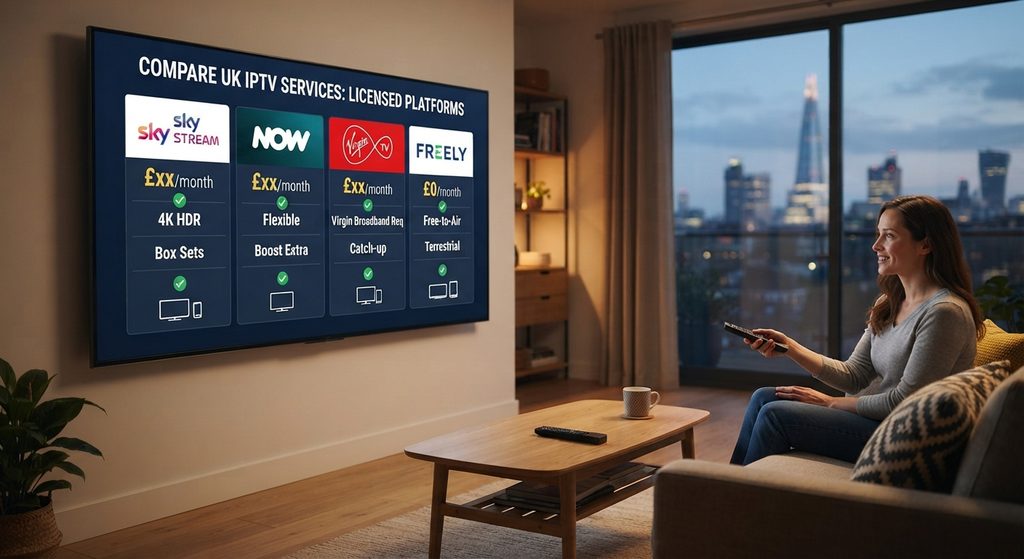
Official UK services to research when searching for the best IPTV UK include Sky Stream, NOW, Virgin TV (such as Virgin Media Stream), EE TV, and the broadcaster-backed platform Freely. Their packages, required hardware, contract lengths, and interactive features differ significantly, so compare the exact plan details of each best IPTV UK contender rather than relying solely on a recognisable brand name. Standalone broadcaster apps—such as BBC iPlayer, ITVX, Channel 4, and My5—may also suit viewers seeking the best IPTV UK experience for terrestrial channels without wanting a paid monthly subscription.
Look for clear company details, transparent pricing, accessible terms of service, and responsive UK customer support to ensure you choose the best IPTV UK provider. A promise of thousands of international channels and every live football match at an unusually low monthly fee deserves extra scrutiny if the provider doesn’t explain who owns the business or how it acquires its broadcast feeds.
Deep Dive into Legitimate UK IPTV Platforms
To identify the best IPTV UK option for your living room, it helps to examine how the major authorised players operate and what kind of viewer each platform serves best.
Sky Stream and Sky Glass
Sky has transitioned aggressively toward internet-only delivery. Sky Stream uses a compact puck that connects to any television via HDMI and links to your home Wi-Fi or Ethernet network. There is no satellite dish required. It integrates live Sky channels, free-to-air channels, and major streaming apps like Netflix, Disney+, and Apple TV+ into a single unified guide.
- Best for: Households wanting a premium, cable-like experience with voice search, cloud-based playlists instead of a traditional hard drive, and access to Sky Sports or Sky Cinema without long-term dish installations.
- Watch out for: Contract lengths vary between 24-month discounts and rolling 31-day plans, with the flexible rolling option carrying a higher monthly base price.
NOW (Formerly NOW TV)
Owned by Sky, NOW operates on a flexible, contract-free membership model. Instead of paying for a full television hardware ecosystem, you download the NOW app onto your existing smart TV, streaming stick, or games console and buy individual “Memberships” (Entertainment, Cinema, Sports, or Hayu).
- Best for: Viewers searching for the best IPTV UK flexibility who only want to subscribe during specific seasons—such as the Premier League run-in or the release of a major HBO drama—and cancel immediately afterward.
- Watch out for: Standard memberships often limit video resolution to 720p or 1080p with stereo sound and include adverts. Unlocking Full HD, 4K HDR, Dolby Atmos, and multi-device streaming requires paying extra for the “Boost” or “Ultra Boost” add-on.
Virgin Media Stream and Virgin TV 360
Virgin Media offers internet-delivered television options alongside its full-fibre broadband packages. Virgin Media Stream is a small plug-in box available to Virgin broadband customers that aggregates live Freeview channels, on-demand apps, and flexible monthly add-on packs for Sky Sports, TNT Sports, and Sky Cinema.
- Best for: Existing Virgin Media broadband subscribers who want a low-commitment way to unify live TV and subscription streaming apps in one place, often with promotional bill credits applied to add-on packs.
- Watch out for: Availability is tied to having an active Virgin Media broadband connection at your address.
EE TV (Formerly BT TV)
EE TV combines live Freeview channels with flexible packages featuring TNT Sports, Sky channels (via NOW integration), and Netflix. Customers can choose between a traditional recordable box with a built-in hard drive or an Apple TV 4K box loaded with a custom EE TV app.
- Best for: Sports fans who want both TNT Sports (for Champions League and Premier League matches) and Sky Sports bundled under a single bill, as well as households that prefer the speed and interface of an Apple TV 4K device.
- Watch out for: Like Virgin, EE TV packages are bundled alongside EE or BT home broadband plans.
Freely and Free-to-Air Broadcaster Apps
Backed by Everyone TV (the joint venture between the BBC, ITV, Channel 4, and Channel 5), Freely is designed to bring live terrestrial television and on-demand catch-up together over Wi-Fi without needing a rooftop aerial. It comes built directly into newer smart TVs from manufacturers like Hisense, Bush, Toshiba, and Panasonic.
- Best for: Budget-conscious households looking for the best IPTV UK zero-cost solution for everyday British television, news, and national sporting events.
- Watch out for: Currently, Freely is primarily integrated into new television sets rather than available as a standalone app for older TVs or third-party streaming sticks. If you own an older TV, using individual broadcaster apps (BBC iPlayer, ITVX, Channel 4) achieves a similar result for free.
Match Channels and Features to Your Household
Check Live Channels, Catch-Up, and On-Demand Content

Before comparing monthly plans for the best IPTV UK, sit down and write out a clear list of the live channels, sports competitions, films, and weekly programmes your household actually watches. Then check each best IPTV UK provider’s current channel lineup and regional availability directly on its official website. Broadcasting rights in the UK change regularly—especially for live football, rugby, cricket, and newly released films—so a competition or show listed on a best IPTV UK platform today may move to a different broadcaster next season.
Pay close attention to the content that matters most to your routine when evaluating the best IPTV UK options. If you follow a specific club in the Premier League, Championship, or European competitions, verify whether your chosen best IPTV UK package covers matches split between Sky Sports, TNT Sports, and Amazon Prime Video. Even the best IPTV UK catalogue of 200 lifestyle and documentary channels has very little real value if it misses the live broadcasts your family tunes into every weekend.
Look for Useful Features and Accessibility Options
Modern internet television is defined as much by its software features as by its channel list. When comparing the best IPTV UK services, check whether your chosen plan includes:
- Live Pause and Rewind: Essential if you regularly get interrupted during live broadcasts.
- Restart TV: Allows you to jump back to the beginning of a live programme even if you tuned in twenty minutes late.
- Cloud Recording or Playlists: Since many modern IPTV boxes lack physical hard drives, check how the platform saves programmes. Some services record to the cloud, while others simply bookmark links to the relevant broadcaster catch-up app—which occasionally means sitting through unskippable adverts.
- User Profiles and Parental Controls: Families benefit greatly from separate profiles that keep recommendations tailored to each person, alongside PIN-protected watershed controls to restrict adult content.
- Accessibility Tools: Subtitles (closed captions), audio description, and high-contrast menus make television accessible for everyone in the home. Never assume these features work identically across every app or device; check the provider’s accessibility documentation beforehand.
Also verify how many screens can stream simultaneously. A provider may allow you to register its app on up to six phones, tablets, and TVs, yet strictly limit playback to only one or two devices at the exact same moment. Confirm the simultaneous stream rules for your specific tier before signing up.
Check Device Support and Streaming Quality
Confirm Device Support Before You Subscribe

Not every streaming app runs on every screen when searching for the best IPTV UK solution. Check the provider’s official compatibility list for your exact television model, streaming box, smartphone, or tablet to ensure seamless best IPTV UK playback. Some best IPTV UK services require dedicated proprietary hardware (like a Sky Stream puck), while others work via apps on Apple TV, Amazon Fire TV, Roku, Google TV, or PlayStation and Xbox consoles.
An older smart TV—even one bought four or five years ago—may no longer receive firmware updates from its manufacturer, meaning newer best IPTV UK apps might run sluggishly or disappear from its app store altogether. If you plan to watch through a separate external streaming stick, confirm that it supports the best IPTV UK service’s full feature set (such as 4K output or surround sound) and factor any one-off hardware purchase price into your budget before checking out to get the best IPTV UK experience.
Test Your Broadband Where You Watch
Streaming live television in High Definition or 4K Ultra HD places continuous demand on your home internet connection. Start by checking the minimum speed recommendations published by the provider:
- Standard Definition (SD): Usually requires 3 to 5 Mbps.
- Full HD (1080p): Generally needs 8 to 15 Mbps per active stream.
- 4K Ultra HD with HDR: Typically demands 25 to 35 Mbps of steady, uninterrupted bandwidth.
Once you know the requirements, run a broadband speed test in the exact room where the television sits—not standing right next to your router in the hallway. Thick brick walls, floor joists, distance, and competing household traffic (such as video calls, cloud backups, or online gaming) can severely degrade Wi-Fi signal strength in a lounge or upstairs bedroom.
If a live stream frequently buffers, drops in resolution, or stutters during fast-moving sports action, try connecting your TV or streaming box directly to the router using a Cat6 Ethernet cable. If running a long cable across the house isn’t practical, consider upgrading to a modern mesh Wi-Fi system or using powerline adapters that send your internet signal through your home’s electrical wiring. A high headline broadband speed from your ISP cannot guarantee smooth playback if your local home network has dead zones.
Understanding Frame Rates and Picture Quality for UK Broadcasts
One technical detail often overlooked when searching for the best IPTV UK experience is frame rate matching. British and European television broadcasts operate at 50Hz (50 frames per second), whereas many American streaming platforms and default smart TV settings operate at 60Hz—a crucial distinction to keep in mind when setting up the best IPTV UK hardware.
If a streaming device outputs a 50Hz UK football match or live news broadcast at 60Hz without proper frame-rate conversion, you may notice subtle micro-stutter or judder whenever the camera pans quickly across the pitch, ruining what should be the best IPTV UK viewing quality. Check whether your television or streaming box supports automatic frame-rate matching (available on devices like Apple TV 4K and newer Fire TV models) to unlock the best IPTV UK motion handling. Choosing a player with proper refresh-rate switching ensures your best IPTV UK subscription delivers live sports as smoothly as a traditional broadcast, giving you the best IPTV UK performance at home.
Compare the Real Price and Subscription Terms
Calculate the Cost After Any Introductory Offer Ends
An eye-catching introductory deal can make a television package look far cheaper than it actually is over a full year. Many major UK providers advertise discounted rates for the first three, six, or eighteen months, followed by a steep jump to the standard out-of-contract monthly price. Always check:
- The standard monthly price once the promotional window expires.
- Whether the provider applies annual mid-contract price increases (many UK telecom and TV companies raise prices every spring by a fixed pound amount or inflation-linked percentage).
- Whether essential features—like HD/4K resolution, ad-free catch-up, or multi-room viewing—cost extra on top of the base tier.
Include any upfront setup fees, activation charges, hardware costs, or courier delivery fees in your total calculation. When comparing providers, make sure you are looking at like-for-like packages rather than pitting a bare-bones entry plan from one company against a complete cinema and sports bundle from another.
Review Cancellation Rules and Household Limits
Before entering your payment details, read the contract terms carefully:
- Minimum Term: Are you committing to a 12-month or 24-month contract, or is it a flexible 30-day rolling subscription?
- Notice Period: Many providers require 30 or 31 days’ notice to cancel, even after your minimum contract term has ended.
- Cancellation Process: Can you cancel easily online with a few clicks, or do you have to phone a retention department during weekday business hours?
Save your order confirmation email, contract summary sheet, and initial receipts in a dedicated folder so you have an exact record of the price and terms you agreed to.
Spot Warning Signs Before You Pay
As internet television has grown in popularity, so too has the number of unauthorised sellers operating online and on social media. Protecting your household means knowing how to distinguish legitimate broadcasters from illicit operators.
Verify the Company and Its Content Rights
A trustworthy provider will always clearly identify the registered UK business behind the service, display a physical company address, and make its terms of service, privacy policy, and customer support channels easy to find. Look for transparent statements confirming its official licensing agreements with UK broadcasters and sports rights holders.
Be extremely wary of claims that sound too good to be true—such as unrestricted access to every Sky Sports channel, TNT Sports, Premier League 3pm kick-offs, international pay-per-view boxing, and thousands of brand-new cinema releases for £10 a month or £60 a year. In the UK, live sports and film distribution rights are strictly segmented across multiple licensed companies; no single legitimate service legally bundles every global subscription channel together at a fraction of standard retail cost.
Legal, Security, and Reliability Risks of Unverified Services
Choosing an unverified provider isn’t just a question of copyright law—it carries immediate practical and security risks for your home:
- Sudden Disappearance: Unlicensed streams are frequently disrupted or shut down permanently during major sporting events following court orders and ISP blocks, leaving subscribers out of pocket with no refund mechanism.
- Malware and Data Theft: Unofficial apps often cannot be downloaded from the official Apple App Store, Google Play Store, or Amazon Appstore. Sellers frequently instruct buyers to “sideload” unknown APK files and disable built-in device security protections. These unvetted applications can harbour malware that monitors your home network or harvests login credentials.
- Payment Fraud: Unregulated sellers rarely use standard UK consumer-protected payment gateways, frequently asking for cryptocurrency, bank transfers, or sketchy third-party payment links that leave you with zero chargeback protection if the service fails.
Protect Your Account, Devices, and Payment Details
Stick strictly to official app stores or the verified website of a recognised UK broadcaster or telecom operator. Never disable your smart TV or streaming stick’s security settings because an online seller instructs you to do so.
Create a strong, unique password for every television and streaming account you open, enable two-factor authentication where available, and check your bank or credit card statements during the first two months of a new subscription to confirm that billing matches what you authorised.
Step-by-Step Checklist: Choose the Best IPTV UK Option for Your Priorities
1. Build a Short, Practical Comparison
Rather than getting lost in dozens of browser tabs, compare three or four legitimate services side by side using a simple checklist:
- Must-Have Channels & Sports: Does it carry the exact live channels and competitions your household watches every week?
- Device Compatibility: Does it run natively on your current TV or streaming box, or do you need to buy extra hardware?
- Full Annual Cost: What is the total cost over 12 months, including setup fees, hardware, add-ons (like HD/4K boosts), and any mid-contract price rises?
- Contract Flexibility: Can you pause or cancel easily if your viewing habits or budget change?
- Simultaneous Streams: Can two people watch different programmes in separate rooms at the same time?
Check current details directly on each provider’s official UK website right before subscribing. Packages, introductory discounts, and supported devices change frequently throughout the year, and older online reviews may describe tiers that have since been retired.
2. Choose Around the Way You Actually Watch
- If live sport is your top priority: Focus on packages that bundle Sky Sports and TNT Sports cleanly (such as Sky Stream, EE TV, Virgin Media, or flexible NOW Sports memberships) and pair them with a wired Ethernet connection for reliable 50fps playback.
- If box sets and films matter most: Compare on-demand libraries across Sky Entertainment/Cinema, NOW, Netflix, Disney+, and Prime Video, paying close attention to 4K HDR support and ad-free tiers.
- If your household watches mostly terrestrial UK TV: Explore a Freely-enabled smart TV or use the official free apps from the BBC, ITV, Channel 4, and Channel 5—saving your money for the occasional one-off streaming subscription when a must-watch series drops.
Conclusion: Choose an Authorised Service That Earns Its Price
“IPTV” describes the technology that brings television over your broadband line; it doesn’t confirm that a provider has legal permission to broadcast its programmes. By verifying the company behind the platform, checking its official content rights, testing your broadband speed in the room where you watch, and calculating the true cost beyond introductory discounts, you can avoid unreliable sellers and hidden fees. Take the time to compare a shortlist of legitimate British platforms against the programmes your household genuinely enjoys, and choose the best IPTV UK service that delivers dependable quality day after day.